
在 GitHub Issue 中 @agent 下达任务,AI 编码智能体自动执行、校验、提 PR 并回复结果。
code-bee 是一个极简的 AI 编码调度器。它不写代码,只做一件事:发现 Issue 中的任务,交给编码智能体去完成。像蜂巢中的工蜂一样,每个 Agent 各司其职,而你只需要在 Issue 中 @agent-name 描述需求。
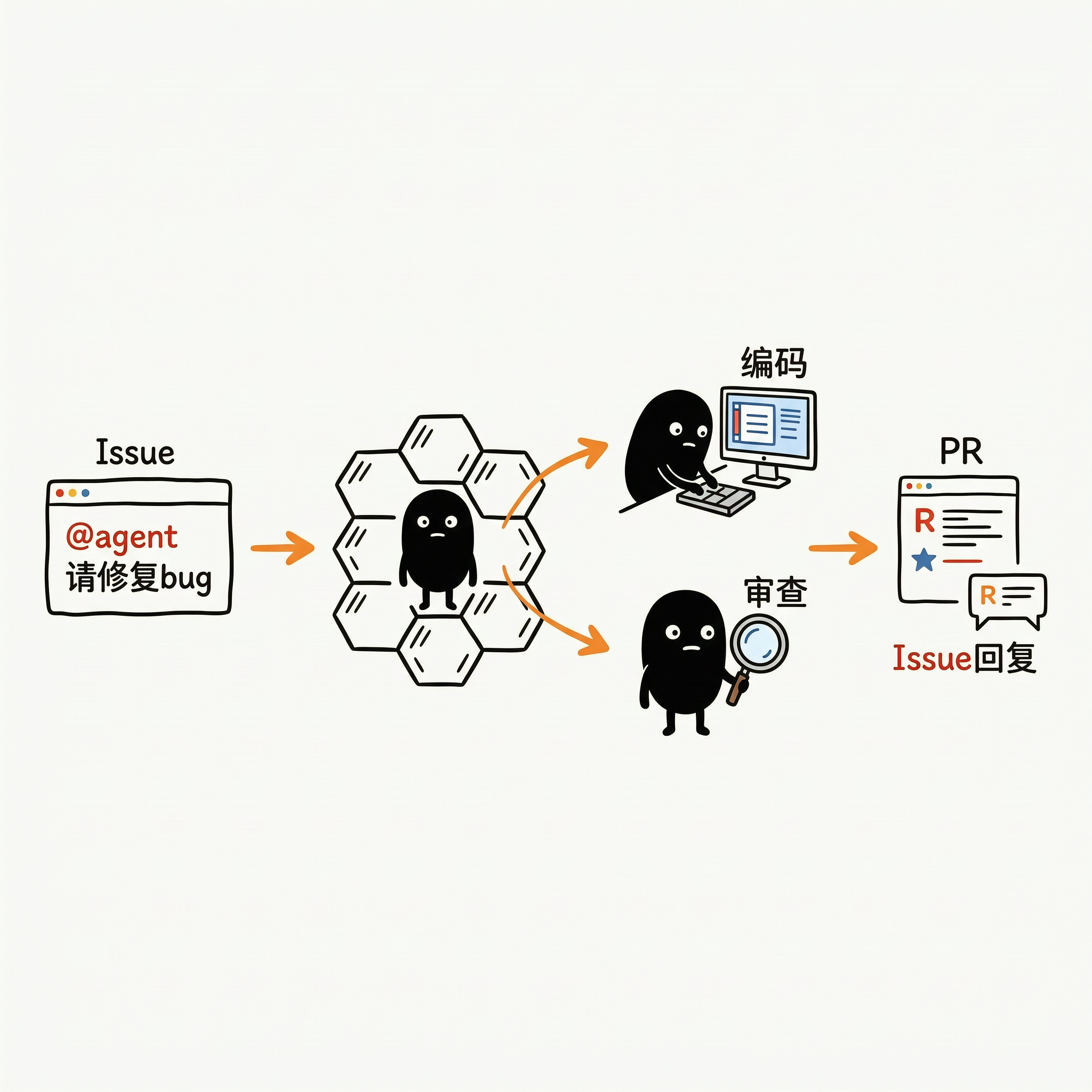
- Issue 即任务面板 —— 不需要额外工具,GitHub Issue 就是你的任务系统
- @ mention 即调度 ——
@agent-frontend重构组件、@agent-backend修 bug,像 @ 同事一样自然 - 零侵入 —— code-bee 本身不触碰你的代码,所有操作由智能体独立完成
- 场景驱动调度 —— 角色体系和管线流程由 YAML workflow 配置驱动,不再硬编码;内置默认开箱即用,
--workflow支持完全自定义
| 组件 | 项目 | 说明 |
|---|---|---|
| 🧠 编码智能体 | Reasonix × DeepSeek | 接收任务指令,自主完成读 Issue → 编码 → 提 PR 全流程 |
| 🔧 Git 操作 | GitHub CLI (gh) |
智能体通过 gh 完成 fork、clone、commit、push、create PR |
| 🏗️ 调度器 | code-bee (Go 1.23+) | 解析 Issue 中的 @agent,按 workflow 配置编排 stage/parallel/loop,驱动智能体执行 |
| ✅ 代码校验 | golangci-lint + conform | 静态分析 + 目录结构校验 |
code-bee 采用 四层分层架构:CLI 入口 → pipeline 薄封装 → runtime 核心引擎 → schema 配置定义。调度策略完全由 workflow.yaml 驱动,runtime.Engine 遍历 Pipeline 并按终止语义决定提前返回或继续。
flowchart TB
    subgraph CLI["cmd/worker · CLI 入口"]
        main["main() → runCLI()"]
        build["buildService()<br/>parseExtraFlags + loadWorkflow"]
        report["reportDispatchResult()<br/>Result → 退出码"]
    end

    subgraph Schema["internal/schema · 配置定义"]
        loader["Loader<br/>YAML + 三层 JSON Schema 校验"]
        types["Workflow / Tool / Stage<br/>Loop / Condition / LoopJudge"]
    end

    subgraph Pipe["internal/pipeline · 薄封装层"]
        svc["Service<br/>持有 *Engine + *Workflow"]
        arts["ArtifactSet<br/>文件契约目录"]
        adapt["ArtifactResolverAdapter<br/>ArtifactSet ⇄ ArtifactResolver"]
        contracts["contracts.go<br/>typed result loaders"]
    end

    subgraph RT["internal/runtime · 核心引擎"]
        eng["Engine<br/>遍历 Pipeline + 终止语义"]
        reg["ToolRegistry<br/>name/alias → Tool"]
        pb["PromptBuilder<br/>embed 内置 + overlay 外部"]
        ec["ExecutionContext<br/>stages map + loopStack"]
        se["StageExecutor"]
        pe["ParallelExecutor<br/>fork-join 写隔离"]
        le["LoopExecutor<br/>max_iter / exit_when / judge"]
        at["AgentTool<br/>render + runner.Run"]
        ct["CommandTool<br/>exec.CommandContext"]
        ft["FunctionTool (桩)"]
        arIface["«interface»<br/>ArtifactResolver"]
        runnerIface["«interface»<br/>Runner"]
    end

    subgraph Ext["外部依赖"]
        agentRunner["agent.Runner<br/>Reasonix × DeepSeek"]
        platformClient["platform.Client<br/>GitHub"]
    end

    main --> build
    build -->|"加载 workflow"| loader
    loader --> types
    build --> svc
    main -->|"Dispatch(ctx, cfg)"| svc
    platformClient --> svc
    svc --> eng
    svc --> arts
    arts --> adapt
    eng --> ec
    eng --> se
    eng --> pe
    eng --> le
    se --> reg
    reg --> at
    reg --> ct
    reg --> ft
    at --> pb
    at --> runnerIface
    runnerIface -.->|"实现"| agentRunner
    at -->|"LoadResult"| arIface
    arIface -.->|"实现"| adapt
    adapt --> contracts
    svc -->|"EngineResult → Result"| report
分层职责:
| 层 | 包 | 职责 |
|---|---|---|
| CLI | cmd/worker |
flag 解析、workflow 加载、构造 Service、退出码映射 |
| pipeline | internal/pipeline |
薄封装层:持有 Engine、管理文件契约目录、typed 结果校验 |
| runtime | internal/runtime |
核心引擎:编排原语执行器、工具注册表、prompt 渲染、上下文管理 |
| schema | internal/schema |
配置定义:YAML 加载 + 三层 JSON Schema 语义校验 |
关键解耦:runtime 包通过 ArtifactResolver 和 Runner 两个接口与外部解耦——pipeline 层用 ArtifactResolverAdapter 桥接文件契约,CLI 注入真实的 agent.Runner 实现。runtime 不依赖 pipeline(避免循环依赖)。
下图展示单次 Dispatch 从 CLI 到智能体执行的完整调用链,含结果文件读写时序:
sequenceDiagram
    participant CLI as runCLI
    participant Svc as Service.Dispatch
    participant Eng as Engine.Run
    participant SE as StageExecutor
    participant Tool as AgentTool
    participant PB as PromptBuilder
    participant Runner as agent.Runner
    participant AR as ArtifactResolver
    participant FS as 文件系统

    CLI->>Svc: Dispatch(ctx, cfg)
    Svc->>Svc: 创建 ArtifactSet + PlatformContext
    Svc->>Svc: 包装 ArtifactResolverAdapter
    Svc->>Eng: Run(deps{Artifacts, Platform, Config})
    Eng->>Eng: NewExecutionContext
    loop 遍历 workflow.Pipeline
        Eng->>SE: Execute(step, ec)
        SE->>SE: 求值 when 条件
        SE->>SE: registry.Resolve(tool)
        SE->>AR: ResolveResultFile(stageName)
        AR-->>SE: resultFilePath
        SE->>FS: ResetResultFile(删除旧文件)
        SE->>SE: ec.Lookup(input_from)
        SE->>Tool: Execute(Invocation)
        Tool->>PB: Build(promptTemplate, data)
        PB-->>Tool: rendered prompt
        Tool->>Runner: Run(ctx, kind, prompt)
        Runner-->>Tool: RunResult{Output}
        Tool->>AR: LoadResult(stageName, path)
        AR->>FS: 读取结果文件
        AR-->>Tool: map[string]any
        Tool->>Tool: extractStatus → StepResult
        Tool-->>SE: StepResult
        SE->>SE: ec.SetResult
        SE-->>Eng: StepResult
        alt Blocked / ManualRequired / Completed
            Eng-->>Svc: 提前返回 EngineResult
        end
    end
    Eng-->>Svc: EngineResult
    Svc-->>CLI: pipeline.Result
关键时序点:
- StageExecutor 先 reset 结果文件——防止读到上一轮残留数据
- AgentTool 渲染 prompt 后才调 runner——prompt 数据由
buildPromptData从 ExecutionContext 派生 - 结果文件是 stage 间通信媒介——
ec.SetResult存内存快照供when/exit_when求值,LoadResult读磁盘文件做 typed 校验 - 终止语义即时生效——任一 stage 返回
Blocked/ManualRequired/Completed,Engine 立即跳出 Pipeline 循环返回
下图展示 workflow + prompt 模板的加载链,以及结果文件在 stage 间的流转:
flowchart LR
    subgraph 配置加载["配置加载(启动时一次性)"]
        direction TB
        embedWf["default_workflow.yaml<br/>(go:embed)"]
        extWf["--workflow xxx.yaml"]
        loader["schema.Loader<br/>YAML + Schema 校验"]
        wf["*schema.Workflow"]

        embedP["prompts/*.md<br/>(go:embed, 5 个内置)"]
        extP["--prompts-dir ./dir/"]
        pb["PromptBuilder<br/>overlay 同名覆盖"]
        templates["templates map"]

        embedWf --> loader
        extWf --> loader
        loader --> wf
        embedP --> pb
        extP --> pb
        pb --> templates
    end

    subgraph 运行时["运行时数据流(Dispatch 时)"]
        direction TB
        cfg["Config<br/>Repo/Issue"]
        arts["ArtifactSet<br/>.code-bee/runs/repo/issue-N/"]
        ec["ExecutionContext<br/>stages map"]

        s1["stage: issue-handling<br/>→ issue_intake_result.json"]
        s2["stage: coding<br/>→ coding_result.json"]
        s3["stage: review<br/>→ review_result.json"]

        cfg --> arts
        s1 -->|"写入"| arts
        arts -->|"读取"| ec
        ec -->|"input_from"| s2
        s2 -->|"写入"| arts
        arts -->|"读取"| ec
        ec -->|"input_from"| s3
        s3 -->|"写入"| arts
    end

    wf --> ec
    templates -->|"渲染 prompt"| s1
    templates -->|"渲染 prompt"| s2
    templates -->|"渲染 prompt"| s3
配置加载语义:
- workflow 双源:
go:embed内置default_workflow.yaml作为兜底,--workflow指定外部 YAML 完全替换(非 overlay) - prompt overlay:内置 5 个模板(issue-handling/coding/review/issue-post/loop-judge),
--prompts-dir目录下同名.md文件覆盖内置,未覆盖的仍用内置(用户只需写想改的) - 结果文件流转:每个 stage 把结构化 JSON 写入 ArtifactSet 目录,下游 stage 通过
input_from经 ExecutionContext 读取,when/exit_when条件也基于这些字段求值
Engine 遍历 Pipeline 时,根据 StepResult 的状态字段决定是否提前返回:
| StepResult 字段 | Engine 行为 | EngineResult |
|---|---|---|
Blocked = true |
立即终止 | {Success: true, Blocked: true} |
ManualRequired = true |
立即终止 | {Success: true, ManualRequired: true} |
Completed = true |
立即终止 | {Success: true, Completed: true} |
| Pipeline 走完无终止 | 正常结束 | {Success: true, Completed: true} |
⚠️ 已知缺口:Engine 遇Blocked立即终止,导致issue-post-blocked阶段(阻塞评论提交)无法运行。后续计划通过on_blocked: continue增强恢复该阶段。
- Go 1.23+
- Reasonix 已安装并配置
- GitHub CLI 已安装并登录 (
gh auth login)
git clone https://github.com/JiGuangWorker/code-bee.git
cd code-bee
make build- 在 GitHub Issue 中用
@agent-name下达任务:
## 任务
@agent-frontend 请把 UserProfile 组件从 class 重构为 hooks

## 详细说明
- 使用 TypeScript
- 保持 API 兼容
- 补充单元测试

## 验收标准
- [ ] npm run lint 通过
- [ ] npm run test 通过
- [ ] npm run build 通过- 运行 code-bee 指向该 Issue:
# 使用内置默认 workflow(开箱即用)
code-bee --repo your-org/your-repo --issue 42

# 或指定自定义 workflow
code-bee --repo your-org/your-repo --issue 42 --workflow ./my-workflow.yaml- code-bee 自动完成后续流程:
🐝 code-bee 0.1.0
📦 仓库: your-org/your-repo | Issue: #42

🚀 正在执行 workflow 驱动的调度流程...

✅ reviewer 已明确 PASS,且最终 Issue 回复已提交,任务执行完成
.
├── cmd/worker/              # CLI 入口,加载 workflow 并启动调度
├── internal/
│   ├── agent/               # 编码智能体执行器(runner)
│   ├── config/              # 运行时配置(Repo/IssueNumber/Token)
│   ├── parser/              # Issue 解析
│   ├── pipeline/            # 文件契约 + runtime.Engine 薄封装 + ArtifactResolver 适配层
│   ├── platform/            # 平台适配(GitHub 等)
│   ├── runtime/             # 可编排执行引擎(Engine/Tool/Executor/PromptBuilder + 默认 workflow)
│   └── schema/              # 三层 JSON Schema + YAML 加载器 + 语义校验
├── pkg/version/             # 版本信息
├── Makefile                 # 统一操作入口
├── .conform.yaml            # 目录结构校验
└── .golangci.yml            # 代码规范检查
code-bee 的调度策略完全由 YAML workflow 配置驱动。无 --workflow flag 时使用内置默认配置(等价于原四阶段 harness),提供自定义 YAML 即可重定义角色体系和管线流程。
一个 workflow 包含两部分:工具集(tools)和管线编排(pipeline)。
# 工具集:定义可用角色及其能力
tools:
  - name: coder                    # 内部标识,pipeline 引用此名
    display_name: 开发者            # 类人展示名,渲染进 prompt
    aliases: [开发者]               # @mention 别名,Issue 中 @ 任一别名都可触发
    type: agent
    prompt_template: coding         # 引用内置 prompt 模板

  - name: reviewer
    display_name: QA负责人
    aliases: [QA负责人, 代码审核员]
    type: agent
    prompt_template: review

# 管线编排:用 stage / parallel / loop 三种原语组合流程
pipeline:
  - stage:
      name: issue-handling
      tool: issue-handling
      output: issue_intake_result.json

  - loop:
      id: coding-review
      max_iterations: 3             # 硬上限,防止死循环
      exit_when:
        - stage: review
          field: status
          operator: equals
          value: PASS
      body:
        - stage: { name: coding, tool: coder, input_from: issue-handling }
        - stage: { name: review, tool: reviewer, input_from: coding }
      judge:                        # 可选:价值评估员
        tool: loop-judge
start_round: 1| 原语 | 语义 | 适用场景 |
|---|---|---|
stage |
串行单步 | 顺序执行的单个阶段 |
parallel |
并行执行(fork-join) | 多个独立检查同时跑 |
loop |
循环(含 max_iterations / exit_when / judge) |
coder-reviewer 迭代 |
支持嵌套:loop body 内可含 parallel,parallel 内可含 stage。阶段可通过 when 条件实现跳过。
| 类型 | 用途 | 示例 |
|---|---|---|
agent |
调用 AI 智能体执行任务 | 编码、审查、Issue 提交 |
command |
执行 shell 命令 | golangci-lint run、npm test |
function |
调用注册的 Go 函数 | 内置扩展点(预留) |
prompt 模板中的角色展示名(如 @{{.DefaultAgent}})从 workflow.Tools 按 prompt_template 自动派生,不再硬编码。用户只需在 tool 定义中设置 display_name,prompt 渲染时自动取用。
- Schema 定义 —— 三层 JSON Schema 与校验机制
- 默认 workflow —— 内置配置参考
- Prompt 模板 —— 5 个内置模板文件
code-bee 的场景驱动调度已落地,未来计划扩展的方向包括:
- 场景驱动调度 —— 角色、管线、循环参数完全由 YAML workflow 配置驱动(#11)
- 可编排管线 —— stage / parallel / loop 三种原语,支持嵌套与条件跳过
- 工具别名 ——
@mention别名机制,角色体系完全可自定义 - 阻塞评论恢复 —— 增强 Engine 支持
on_blocked: continue,恢复 issue-post-blocked 阶段 - 多智能体支持 —— 除 Reasonix 外,接入 Qoder、Cline 等更多编码智能体
- GitLab 适配 —— 将 Issue → MR 的调度能力扩展到 GitLab 平台
- Webhook 触发 —— 支持 Issue 事件自动触发,无需手动执行 CLI
- 校验管线 —— 用
command工具组合 lint → test → build → security scan 流程
💡 欢迎提 Issue / PR 一起建设!每个想法都值得被讨论。
如果你对「让 AI 像同事一样协作编码」这件事感兴趣,欢迎加入:
- Fork 本仓库
- 创建特性分支 (
git checkout -b feat/amazing-idea) - 提交变更 (
git commit -m 'feat: add amazing idea') - 推送到分支 (
git push origin feat/amazing-idea) - 创建 Pull Request
make build              # 编译
make test               # 运行测试
make lint               # 代码检查
make check-structure    # 目录结构校验
make check-all # 全部校验MIT © JiGuangWorker