A simple, yet powerful general utility library for C.
tostring()utilities to format values into a heap-allocated char bufferlenasstr()utilities to get the length of a formatted string without actually creating it- OS detector macros to add per-OS compile-time functionality
Compile-time error on unknown platform by default, can be silenced by defining
UTILS_ALLOW_UNKNOWN_PLATFORM panic()utilities to quickly and safely print an error and exit the programfastwrite()wrapper aroundwrite()to print text withoutstdio.hbufferingenable_wincon_ansi()utility to enable ANSI escape codes on Windows Consolemin(),max()andclamp()macros supporting bothintanddoubledata types- Comprehensive list of CSI ANSI escape sequences, as well as some utilities to use them in a more user-friendly way
- libutils versioning macros via
UTILS_VERSION,UTILS_VERSION_MAJOR,UTILS_VERSION_MINORandUTILS_VERSION_PATCH
libutils defines constants to check for specific versions of the library.
| Macro name | Example |
|---|---|
| UTILS_VERSION | "1.1.0" |
| UTILS_VERSION_MAJOR | 1 |
| UTILS_VERSION_MINOR | 1 |
| UTILS_VERSION_PATCH | 0 |
The libutils OS detector defines IS_WINDOWS, IS_LINUX, IS_MACOS and IS_UNKNOWN if UTILS_ALLOW_UNKNOWN_PLATFORM is defined. If it isn't, libutils will throw a compile-time error if the OS can't be recognised using _WIN32, _WIN64, __linux__, __APPLE__ or __MACH__.
The OS as a human-readable string is stored in OS, or as a number in OS_TYPE.
| OS number | OS |
|---|---|
| 0 | Unknown |
| 1 | Windows |
| 2 | Linux |
| 3 | macOS |
Numerical constants OS_UNKNOWN, OS_WINDOWS, OS_LINUX and OS_MACOS are defined as 0, 1, 2 and 3 respectively to reduce 'magic numbers'.
| Function signature | Description |
|---|---|
| char* tostring(const char* fmt, ...) | Format values into a heap-allocated string |
| char* vtostring(const char* fmt, va_list args) | Format values provided via args into a heap-allocated string |
| int lenasstr(const char* fmt, ...) | Return what the length of the output string would be, without actually formatting it |
| int vlenasstr(const char* fmt, va_list args) | Return what the length of the output string would be, without actually formatting it, receiving parameters through args |
| void panic(const char* fmt, ...) | Quickly and safely exit the program with a message |
| void vpanic(const char* fmt, va_list args) | Quickly and safely exit the program with a message and variable arguments supplied via args |
| char* timestr(time_t* t) | Returns UNIX timestamp formatted as a human-readable date and time |
| min(a, b) | Macro to get the min of two ints or doubles |
| max(a, b) | Macro to get the max of two ints or doubles |
| clamp(val, min, mx) | Macro to clamp a value between two ints or doubles |
| int imin(int a, int b) | Returns the lowest of two integers |
| double dmin(double a, double b) | Returns the lowest of two doubles |
| int imax(int a, int b) | Returns the highest of two integers |
| double dmax(double a, double b) | Returns the highest of two doubles |
| int iclamp(int val, int min, int max) | Clamp an integer value between two integers |
| double dclamp(double val, double min, double max) | Clamp a double value between two doubles |
| void enable_wincon_ansi(void) | Enables ANSI escape codes on Windows Console |
| arrlen(arr) | Returns length of array arr |
| void fastwrite(int stream, const char* string) | Wrapper around write() to quickly write a string to the screen without buffering |
| sz_fastwrite(stream, string) | Macro to provide similar functionality to fastwrite() using sizeof() rather than strlen() |
| Variable type | Variable name | Description |
|---|---|---|
| bool | WINCON_ANSI_ENABLED | true/false depending on whether enable_wincon_ansi() has been called |
Note
All macros which take input return the result in the form of a heap-allocated string, so it must be freed manually.
Note
To enable ANSI escape codes on Windows, call the enable_wincon_ansi() function.
| Macro name | Description |
|---|---|
| ANSI_CUR_HOME | Moves the text cursor to the top left of the screen. |
| ANSI_CUR_POS(x,y) | Moves the cursor to (x, y) |
| ANSI_CUR_UP(y) | Moves the cursor up y lines |
| ANSI_CUR_DOWN(y) | Moves the cursor down y lines |
| ANSI_CUR_RIGHT(x) | Moves the cursor right x rows |
| ANSI_CUR_LEFT(x) | Moves the cursor left x rows |
| ANSI_CUR_LINE_DOWN(y) | Moves cursor to beginning of line y lines down |
| ANSI_CUR_LINE_UP(y) | Moves cursor to beginning of line y lines up |
| ANSI_CUR_COLUMN(x) | Moves cursor to column x |
| ANSI_CUR_UP_ONE | Moves cursor one line up |
| ANSI_CUR_SAVE_LEGACY | Saves cursor position (DEC, shouldn't be used on modern systems) |
| ANSI_CUR_RESTORE_LEGACY | Restores cursor position from saved point (DEC, shouldn't be used on modern systems) |
| ANSI_CUR_SAVE | Saves cursor position |
| ANSI_CUR_RESTORE | Restores cursor position from saved point |
| ANSI_ERASE_FROM_CUR | Erases from cursor to end of screen |
| ANSI_ERASE_UNTIL_CUR | Erase from cursor to beginning of screen |
| ANSI_ERASE_ALL | Clear entire screen |
| ANSI_ERASE_SAVED | Clear screen and scrollback |
| ANSI_ERASE_LINE_FROM_CUR | Erase entire line from cursor |
| ANSI_ERASE_LINE_UNTIL_CUR | Erase entire line until cursor |
| ANSI_ERASE_LINE | Erase entire line |
| ANSI_RESET | Reset colours and styling |
| ANSI_STYLE_BOLD | Sets bold text style |
| ANSI_RESET_STYLE_BOLD | Resets bold text style |
| ANSI_STYLE_DIM | Sets dim/faint text style |
| ANSI_RESET_STYLE_DIM | Resets dim/faint text style |
| ANSI_STYLE_ITALIC | Sets italic text style |
| ANSI_RESET_STYLE_ITALIC | Resets italic text style |
| ANSI_STYLE_UNDERLINE | Sets underline text style |
| ANSI_RESET_STYLE_UNDERLINE | Resets underline text style |
| ANSI_STYLE_BLINK | Sets blinking text style |
| ANSI_RESET_STYLE_BLINK | Resets blinking text style |
| ANSI_STYLE_REVERSE | Sets inverted colour scheme |
| ANSI_RESET_STYLE_REVERSE | Resets inverted colour scheme |
| ANSI_STYLE_HIDDEN | Sets hidden text style |
| ANSI_RESET_STYLE_HIDDEN | Resets hidden text style |
| ANSI_STYLE_STRIKETHROUGH | Sets strikethrough text style |
| ANSI_RESET_STYLE_STRIKETHROUGH | Resets strikethrough text style |
| ANSI_FG_BLACK | Sets black foreground colour |
| ANSI_BG_BLACK | Sets black background colour |
| ANSI_FG_RED | Sets red foreground colour |
| ANSI_BG_RED | Sets red background colour |
| ANSI_FG_GREEN | Sets green foreground colour |
| ANSI_BG_GREEN | Sets green background colour |
| ANSI_FG_YELLOW | Sets yellow foreground colour |
| ANSI_BG_YELLOW | Sets yellow background colour |
| ANSI_FG_BLUE | Sets blue foreground colour |
| ANSI_BG_BLUE | Sets blue background colour |
| ANSI_FG_MAGENTA | Sets magenta foreground colour |
| ANSI_BG_MAGENTA | Sets magenta background colour |
| ANSI_FG_CYAN | Sets cyan foreground colour |
| ANSI_BG_CYAN | Sets cyan background colour |
| ANSI_FG_WHITE | Sets white foreground colour |
| ANSI_BG_WHITE | Sets white background colour |
| ANSI_FG_DEFAULT | Resets foreground colour to default |
| ANSI_BG_DEFAULT | Resets background colour to default |
| ANSI_FG_BRIGHT_BLACK | Sets bright black foreground colour |
| ANSI_BG_BRIGHT_BLACK | Sets bright black background colour |
| ANSI_FG_BRIGHT_RED | Sets bright red foreground colour |
| ANSI_BG_BRIGHT_RED | Sets bright red background colour |
| ANSI_FG_BRIGHT_GREEN | Sets bright green foreground colour |
| ANSI_BG_BRIGHT_GREEN | Sets bright green background colour |
| ANSI_FG_BRIGHT_YELLOW | Sets bright yellow foreground colour |
| ANSI_BG_BRIGHT_YELLOW | Sets bright yellow background colour |
| ANSI_FG_BRIGHT_BLUE | Sets bright blue foreground colour |
| ANSI_BG_BRIGHT_BLUE | Sets bright blue background colour |
| ANSI_FG_BRIGHT_MAGENTA | Sets bright magenta foreground colour |
| ANSI_BG_BRIGHT_MAGENTA | Sets bright magenta background colour |
| ANSI_FG_BRIGHT_CYAN | Sets bright cyan foreground colour |
| ANSI_BG_BRIGHT_CYAN | Sets bright cyan background colour |
| ANSI_FG_BRIGHT_WHITE | Sets bright white foreground colour |
| ANSI_BG_BRIGHT_WHITE | Sets bright white background colour |
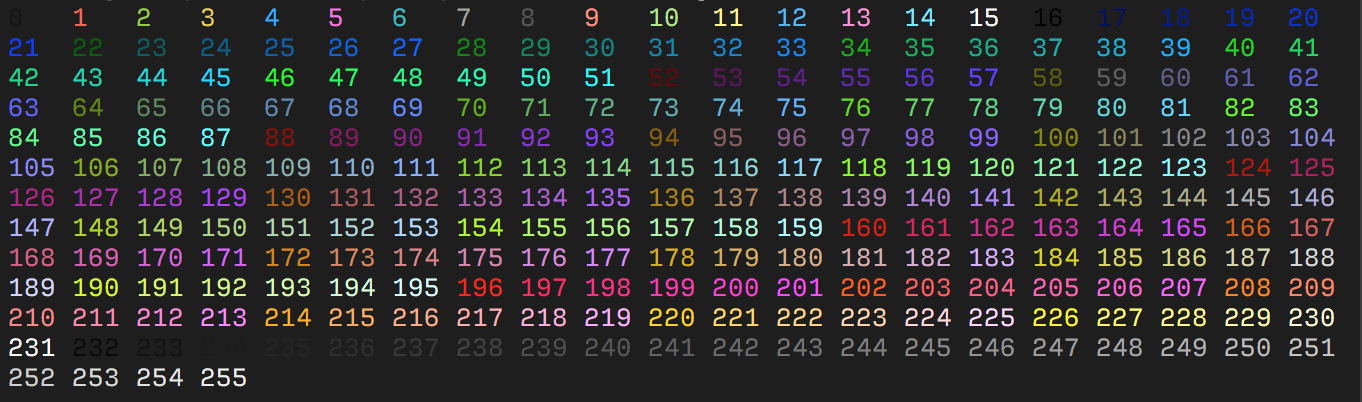
| ANSI_FG_256(a) | Sets foreground colour to the one specified by a from the below palette |
| ANSI_BG_256(a) | Sets background colour to the one specified by a from the below palette |
| ANSI_FG_RGB(r, g, b) | Sets foreground colour to 24-bit Truecolor, where each parameter is an integer from 0 to 255 |
| ANSI_BG_RGB(r, g, b) | Sets background colour to 24-bit Truecolor, where each parameter is an integer from 0 to 255 |
| ANSI_ENABLE_WRAP | Enables line wrapping |
| ANSI_DISABLE_WRAP | Disables line wrapping |
| ANSI_CUR_HIDE | Hides the text cursor |
| ANSI_CUR_SHOW | Shows the text cursor |
| ANSI_SAVE_SCREEN | Saves the screen's contents |
| ANSI_RESTORE_SCREEN | Restores the screen's contents from a saved point |
| ANSI_ALT_BUFFER_ENABLE | Enables the alternate screen buffer |
| ANSI_ALT_BUFFER_DISABLE | Disables the alternate screen buffer |
| ANSI_SET_TITLE(a) | Sets the terminal window title to a |
The 256-colour palette used in ANSI_FG_256() and ANSI_BG_256():