





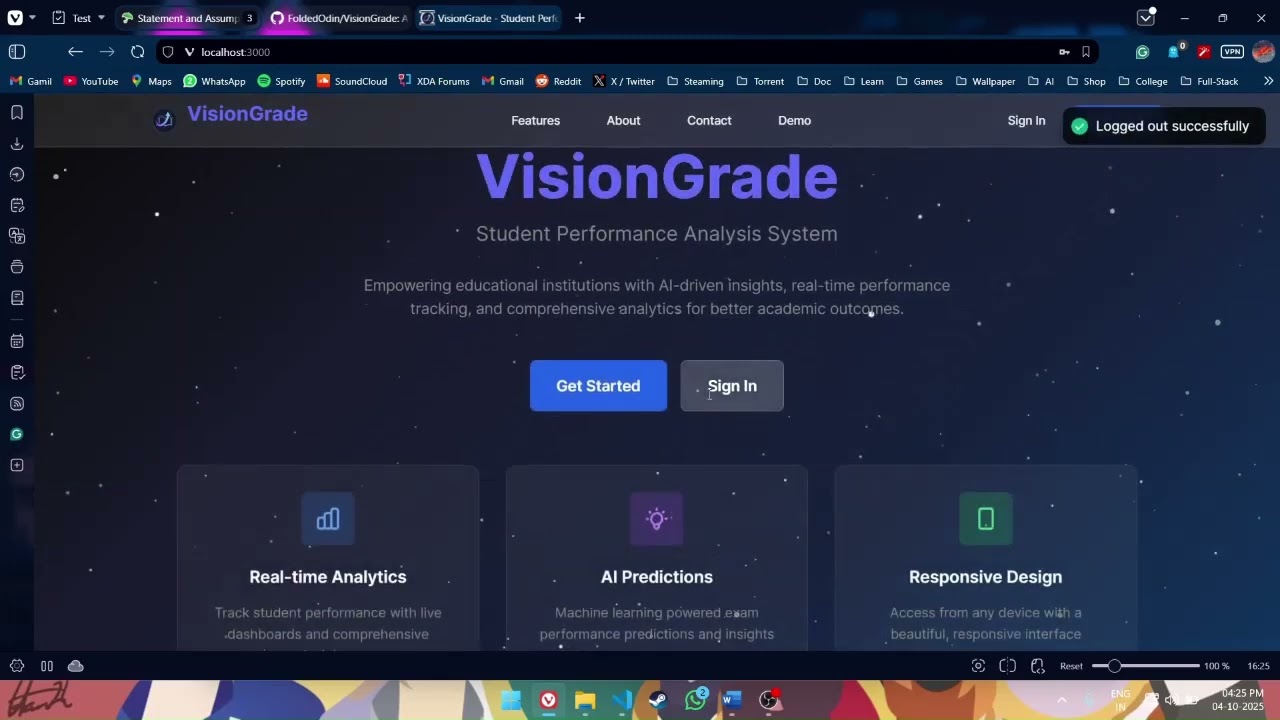
A comprehensive web application for managing student academic data, providing ML-powered performance predictions, and facilitating communication between students, faculty, and administrators. Designed for educational institutions seeking intelligent performance analytics.
- Students - Access grades, attendance, and performance predictions
- Faculty - Manage courses, grades, and student assessments
- Tutors - Support student learning and track progress
- Administrators - Full system control and analytics
- Real-time Monitoring - Track marks and attendance instantly
- Historical Analysis - View performance trends over time
- Goal Setting - Set and track academic targets
- Mobile Responsive - Access data anywhere, anytime
- Performance Predictions - AI-powered exam score forecasting
- Risk Detection - Identify at-risk students early
- Smart Recommendations - Personalized improvement suggestions
- Trend Analysis - Advanced analytics and insights
- Low Attendance Alerts - Automatic warnings for poor attendance
- Performance Warnings - Early intervention for struggling students
- Email Integration - Automated notification delivery
- Real-time Updates - Instant alerts for important events
- PDF Reports - Professional report cards and transcripts
- Performance Insights - Detailed analytics and visualizations
- Progress Reports - Comprehensive academic summaries
- Batch Processing - Generate multiple reports efficiently
- Glassmorphism Design - Beautiful, modern interface
- Smooth Animations - Polished user interactions
- Dark Mode Support - Easy on the eyes
- Fully Responsive - Perfect on all devices













Before you begin, ensure you have the following installed:
(v18 or higher)
(v3.8 or higher)
(v12 or higher)
(optional, for caching)



# 1️⃣ Clone the repository
git clone <repository-url>
cd vision-grade

# 2️⃣ Install all dependencies
npm run install:all

# 3️⃣ Set up environment variables
# Backend
cp backend/.env.example backend/.env
# Edit backend/.env with your database credentials

# ML Service
cp ml-service/.env.example ml-service/.env
# Edit ml-service/.env with your configuration

# 4️⃣ Set up the database
createdb visiongrade_db

# Run migrations
cd backend
npm run migrate

# 5️⃣ Create admin account (Choose one method)
# Quick setup with defaults (Development)
node scripts/create-default-admin.js
# Default Credentials: admin@visiongrade.com / Admin@123

# OR Interactive setup (Production)
node scripts/create-first-admin.js# Start all services at once
npm run dev
# Or start individually:
npm run dev:frontend # Frontend → http://localhost:3000
npm run dev:backend # Backend → http://localhost:5000
npm run dev:ml # ML API → http://localhost:8000- Frontend: http://localhost:3000
- Backend API: http://localhost:5000
- ML Service: http://localhost:8000


cd backend
node scripts/create-default-admin.js
Default Credentials: admin@visiongrade.com / Admin@123
cd backend
node scripts/create-first-admin.js
Follow the interactive prompts to create a secure admin account.
📖 Documentation:
| Script | Description | Status |
|---|---|---|
npm run dev |
Start all services |  |
npm run dev:frontend |
Start frontend only | |
npm run dev:backend |
Start backend only | |
npm run dev:ml |
Start ML service only | |
npm run install:all |
Install all dependencies | |
npm run build |
Build for production | |
npm test |
Run all tests | |
📦 vision-grade/
├── 📁 frontend/                 # React.js frontend
│   ├── 📁 src/
│   │   ├── 📁 components/      # Reusable components
│   │   │   ├── 📄 Dashboard.jsx       # Main dashboard
│   │   │   ├── 📄 StudentCard.jsx     # Student info cards
│   │   │   ├── 📄 GradeTable.jsx      # Grade display table
│   │   │   └── 📄 NotificationBell.jsx # Alert system
│   │   ├── 📁 pages/          # Page components
│   │   │   ├── 📄 Login.jsx          # Authentication page
│   │   │   ├── 📄 StudentDashboard.jsx
│   │   │   ├── 📄 FacultyDashboard.jsx
│   │   │   └── 📄 AdminPanel.jsx
│   │   ├── 📁 hooks/          # Custom hooks
│   │   │   ├── 📄 useAuth.js         # Authentication hook
│   │   │   └── 📄 usePerformance.js  # Performance data hook
│   │   ├── 📁 services/       # API services
│   │   │   ├── 📄 authService.js     # Auth API calls
│   │   │   ├── 📄 studentService.js  # Student API calls
│   │   │   └── 📄 mlService.js       # ML predictions
│   │   └── 📁 utils/          # Utility functions
│   │       ├── 📄 dateFormatter.js   # Date utilities
│   │       └── 📄 gradeCalculator.js # Grade calculations
│   └── 📄 package.json
├── 📁 backend/                 # Node.js/Express backend
│   ├── 📁 controllers/        # Route handlers
│   │   ├── 📄 authController.js      # Authentication logic
│   │   ├── 📄 studentController.js   # Student operations
│   │   └── 📄 gradeController.js     # Grade management
│   ├── 📁 middleware/         # Custom middleware
│   │   ├── 📄 authenticate.js        # JWT verification
│   │   ├── 📄 authorize.js           # Role-based access
│   │   └── 📄 errorHandler.js        # Error management
│   ├── 📁 models/            # Sequelize models
│   │   ├── 📄 User.js               # User model
│   │   ├── 📄 Student.js            # Student model
│   │   ├── 📄 Course.js             # Course model
│   │   └── 📄 Grade.js              # Grade model
│   ├── 📁 routes/            # API routes
│   │   ├── 📄 auth.js               # Auth endpoints
│   │   ├── 📄 students.js           # Student endpoints
│   │   └── 📄 grades.js             # Grade endpoints
│   ├── 📁 services/          # Business logic
│   │   ├── 📄 notificationService.js # Alert system
│   │   └── 📄 reportService.js      # Report generation
│   ├── 📁 scripts/           # Utility scripts
│   │   ├── 📄 create-default-admin.js
│   │   └── 📄 create-first-admin.js
│   ├── 📁 docs/              # Documentation
│   │   └── 📄 ADMIN_SETUP.md
│   └── 📄 package.json
├── 📁 ml-service/             # Python ML service
│   ├── 📁 models/            # Trained ML models
│   │   ├── 📄 performance_model.pkl  # Prediction model
│   │   └── 📄 risk_classifier.pkl    # Risk detection
│   ├── 📁 services/          # ML logic
│   │   ├── 📄 predictor.py          # Prediction service
│   │   └── 📄 analyzer.py           # Analysis service
│   ├── 📁 utils/             # ML utilities
│   │   ├── 📄 preprocessor.py       # Data preprocessing
│   │   └── 📄 feature_engineer.py   # Feature engineering
│   ├── 📄 app.py            # Flask application
│   └── 📄 requirements.txt
├── 📄 DEFAULT_ADMIN_SETUP.md
└── 📄 README.md               # You are here



# Frontend tests
cd frontend && npm test

# Backend tests
cd backend && npm test

# ML service tests
cd ml-service && pytest

# Run all tests
npm test



# Build frontend for production
npm run build

# Start production server
npm start

# Environment variables required:
MONGODB_URI=your-postgresql-connection-string
JWT_SECRET=your-super-secure-jwt-secret
NODE_ENV=production
REDIS_URL=your-redis-url (optional)


We love contributions! Please read our contributing guidelines before getting started.


- 🍴 Fork the repository
- 🌿 Create a feature branch (
git checkout -b feature/amazing-feature) - 💾 Commit your changes (
git commit -m 'Add amazing feature') - 🧪 Add tests for new functionality
- 📤 Push to the branch (
git push origin feature/amazing-feature) - 📥 Open a Pull Request
This project is licensed under the MIT License - see the LICENSE file for details.

Special thanks to the amazing open source community and these fantastic projects:





For support and questions:
- 📧 Email: visiongrade.spas@gmail.com
- 💬 Open an issue
- 📖 Check our documentation


