


GDSII and OASIS chip layouts, parsed and rendered in the browser. A drop-in custom element compiled to pure JS+WASM with a WebGL2 renderer.
Open a layout in your browser to see it
work: drop a .gds or .oas onto the page, or look at the demo layout it
starts with. Nothing is uploaded, and there is nothing to install. The page is
built from the published package, so it is also the quickest way to check what
a given release does.
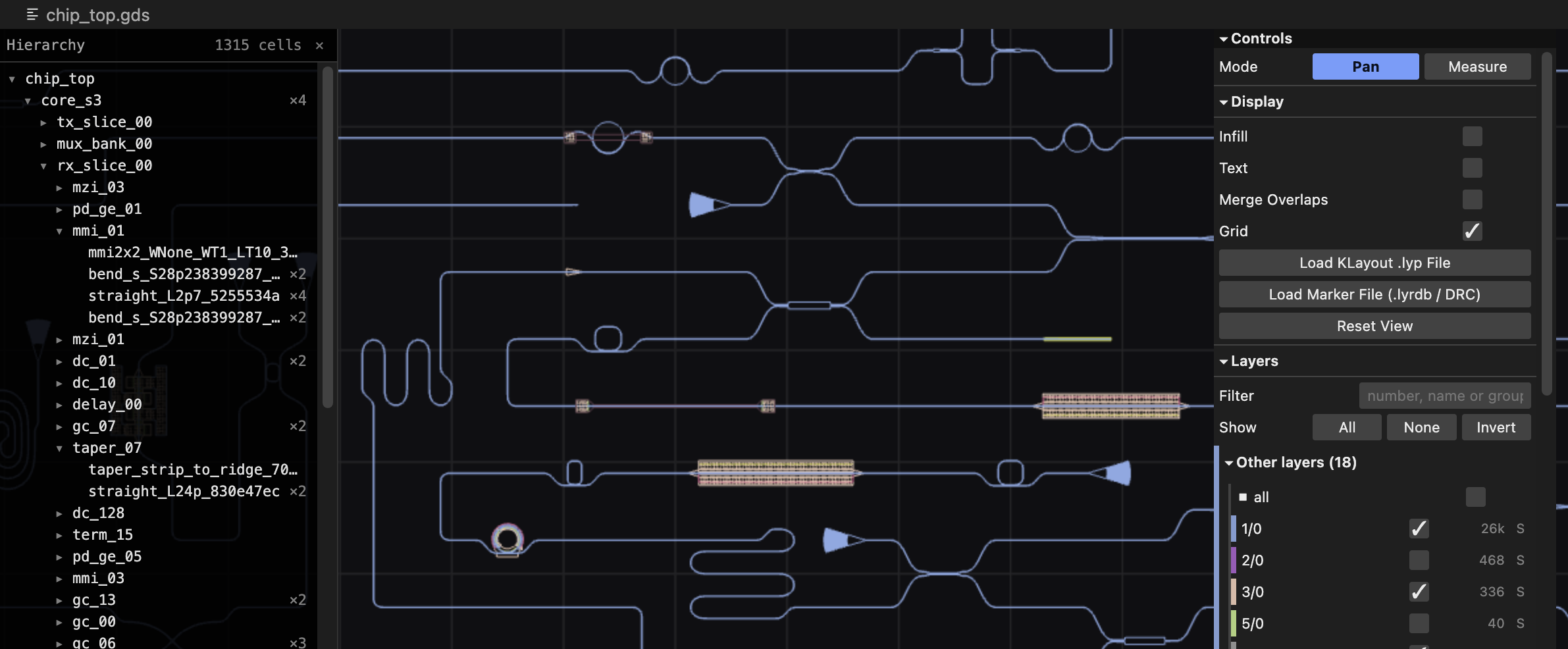
npm install gds-lensimport "gds-lens"; // registers <gds-lens><gds-lens src="chip.gds" style="width: 100%; height: 600px"></gds-lens>That's the whole thing. Pan with the mouse, zoom with the wheel; on a touch screen, drag to pan and pinch to zoom. The import pulls in one self-contained module — the parser, the renderer, the WebAssembly binary, and the control panel — so there is nothing to copy and nothing else to serve.
Or drive it from JavaScript:
import "gds-lens";

const viewer = document.createElement("gds-lens");
viewer.style.cssText = "width: 100%; height: 600px";
document.body.append(viewer);

await viewer.load("chip.gds");        // a URL, or bytes you already have
await viewer.goToPoint(120.5, -40);   // center on a coordinate, in microns
If you would rather serve a payload than bundle one — for a smaller download and a streaming WebAssembly compile — see Embedding GDS Lens.
- Parses GDSII and OASIS. Format and gzip are both detected from the leading bytes rather than the filename. The reader is gdstk itself, which is what other implementations validate against.
- Renders with WebGL2. Layer-batched vertex buffers, GPU instancing for repeated cells, and a stroke font all live in C++ compiled alongside the parser.
- Reads layer properties. A
.lypfile supplies colors, fill styles, and layer names. - Browses DRC and LVS markers. The viewer reads
.lyrdbreport databases and ASCII DRC results. - Navigates hierarchy. You can search cells and labels, and measure distances.
The package ships prebuilt: no Emscripten toolchain is required to consume it.
Installing straight from a git URL does not work, because dist/ is built in
CI rather than committed.
The following sections describe the element's own API. The rest lives beside it:
| Page | What is in it |
|---|---|
| React integration | A wrapper component, the JSX type declaration, server rendering, remounts. |
| Embed the viewer | The ViewerHost interface, the three builds, the subpath exports, and the limits of the WebAssembly module. |
The element is display: block with no intrinsic height, so give it one. It
takes one attribute and exposes a handful of methods.
The element takes one attribute:
| Attribute | Description |
|---|---|
src |
URL of a layout to fetch and display. Setting it later reloads. |
The element exposes the following members:
| Member | Returns | Description |
|---|---|---|
ready |
Promise<ViewerSurface> |
Resolves once the engine has mounted. Every method in the following table awaits this, so you rarely need it directly. |
load(source, options?) |
Promise<void> |
source is a URL string, a Uint8Array, or an ArrayBuffer. options.reload keeps the current camera and layer visibility instead of framing the design. Resolves once the layout is on screen; rejects on a failed fetch, a file the parser refuses, or — with an error named AbortError — when a later load superseded this one. |
showLoading(label?) |
Promise<void> |
Shows the loading overlay, for the wait before a load() of bytes the page is fetching itself. load(url) does this on its own. |
goToPoint(x, y) |
Promise<boolean> |
Centers on a coordinate in microns and flashes a crosshair. Resolves true if the point is inside the layout. |
setLyp(name, text) |
Promise<void> |
Applies a .lyp layer-properties file. Pass "" to clear. |
setMarkers(name, text) |
Promise<void> |
Applies a marker database. The viewer detects the format from the content. |
showError(message) |
Promise<void> |
Replaces the view with an error message. |
destroy() |
Promise<void> |
Releases the viewer's WebAssembly instance and WebGL context for good. Rarely needed — see Removal parks the viewer. |
Every load() cancels the one before it, so two quick changes to src show
the second layout even when the first is the slower download.
The element dispatches two events on itself, whichever way a load was started
— the src attribute, load(), or a host pushing bytes through its surface.
Neither bubbles.
| Event | detail |
When |
|---|---|---|
gds-load |
{ layerCount, cellCount } |
A layout finished loading and is on screen. |
gds-error |
{ message } |
A load failed, or showError() was called. message is the text the viewer shows. |
viewer.addEventListener("gds-load", (event) => {
    console.log(`${event.detail.layerCount} layers, ${event.detail.cellCount} cells`);
});
viewer.addEventListener("gds-error", (event) => {
    reportProblem(event.detail.message);
});
The names carry a prefix because load and error already have meanings —
and types — on every HTML element.
The keys act on the viewer that was last pointed at, so on a page with several they go to the one under the mouse.
| Key | Action |
|---|---|
[ / ] |
Previous / next marker in the selected marker's category. |
m |
Toggle measure mode. Click two points to place a ruler. |
Esc |
Abandon a ruler being placed; with none in progress, clear the finished ones and return to pan mode. Also closes the coordinate menu. |
h |
Show or hide the cell hierarchy. |
/ |
Focus the cell filter box. |
Each <gds-lens> drives its own viewer, with its own shadow tree, its own
WebAssembly instance, and its own WebGL2 context. Put as many on a page as you
like; they share nothing, so a .lyp or a marker database applied to one leaves
the others alone.
Each one costs a WebGL2 context, though, and browsers cap live contexts per page at roughly 8 to 16 — past that the browser starts dropping the oldest. A page showing a dozen layouts at once wants one viewer swapping layouts rather than a dozen elements.
examples/multi-view.html
is a working page of six: three loading a layout from src, three waiting for a
button, one of them created and released on demand to keep a context free.
An element leaving the DOM parks its viewer rather than tearing it down, and
the next <gds-lens> to mount without one of its own adopts it. That is what
makes a framework remount free: the element is new, the viewer is not, and the
parsed design, the camera and the GL context all survive.
An element mounted alongside a live one finds nothing parked and builds its own, which is why the preceding section is true.
Nothing frees a parked viewer on its own. A page that creates viewers it will
never show again, and is hitting the context limit, can call destroy(); an
ordinary unmount should let it park. See
Remounts and StrictMode for what this
means in a framework.
The parser and renderer run in a 32-bit WebAssembly address space, so a layout has to fit — file plus geometry — inside it. See Limits for the numbers and Compressed layouts for what that means for gzipped files.
Building from source requires the
Emscripten SDK
(emcc/emcmake on PATH) and Python 3.10 or later for its driver scripts.
macOS's system python3 is 3.9 and fails with a TypeError on
list[str] | None; with uv:
uv python install 3.13
export EMSDK_PYTHON="$(uv python find 3.13)"
Then build the payloads and run the tests:
git submodule update --init --recursive
npm install
npm run build:wasm     # all three -> src/wasm/build/{web,inline,esm}/
npm run build          # -> dist/{web,inline-wasm,esm}/
npm test
npm run build:wasm:web, :inline, and :esm build one variant each; npm run build then produces whichever outputs it finds the wasm for, and says which it
skipped. The three differ only in link flags, but CMake caches those, so each
gets its own build tree.
npm test includes browser tests that need Chromium
(npx playwright install chromium); they skip if it is missing. The end-to-end
load test runs once per built payload.
Before publishing, npm run check:dist and npm run check:package verify that
the payloads are present and no newer than their sources, and that the tarball
carries nothing it should not. prepublishOnly runs both.
MIT, see LICENCE.md.
The payload carries third-party code in two places. Statically linked into the
WebAssembly: gdstk (BSL-1.0), Clipper
(BSL-1.0), Qhull (Qhull license),
earcut.hpp (ISC), and
zlib (zlib license) — and gds-lens-engine.js is
itself Emscripten's output
(MIT/NCSA). Bundled into the JavaScript beside it:
lil-gui (MIT).
Every notice is reproduced in
THIRD-PARTY-LICENSES.md. Qhull's license in
particular requires its notice to accompany any distribution that includes it,
and its original source can be obtained from
the Qhull website.