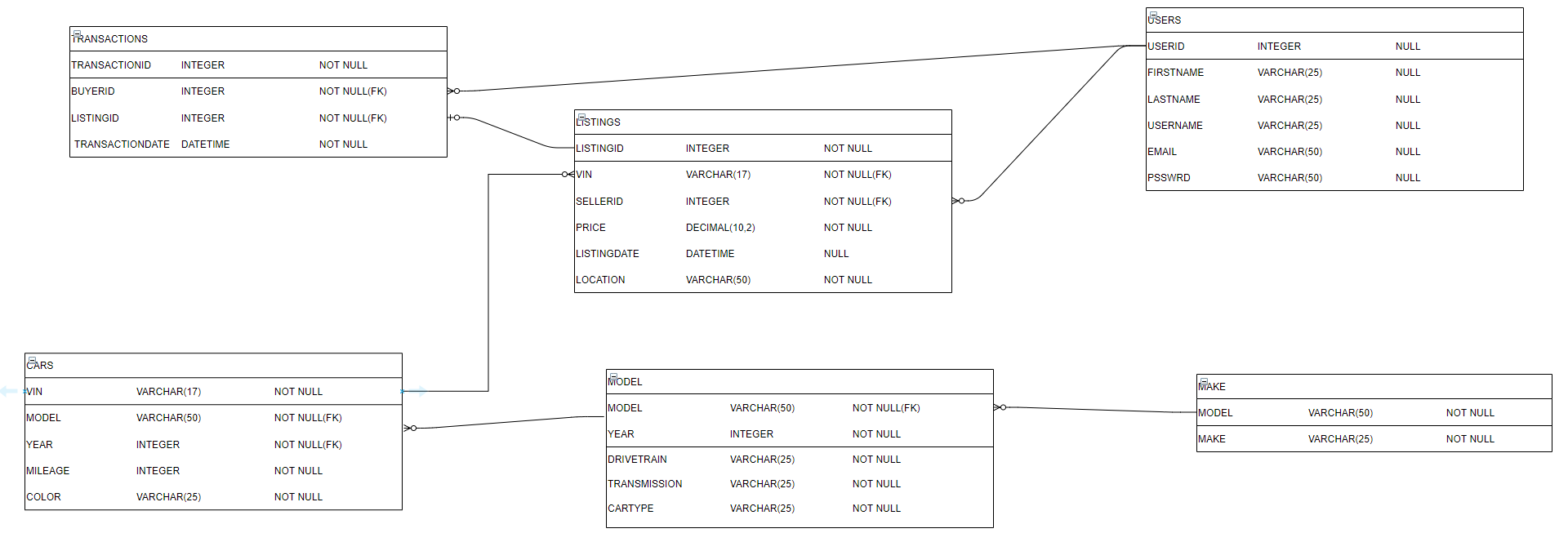
SELECT DISTINCT Listings .listingID , Listings .price , Listings .location ,
Listings .vin , Makes .make , Cars .model , Cars .year , Cars .mileage ,
Users .userName
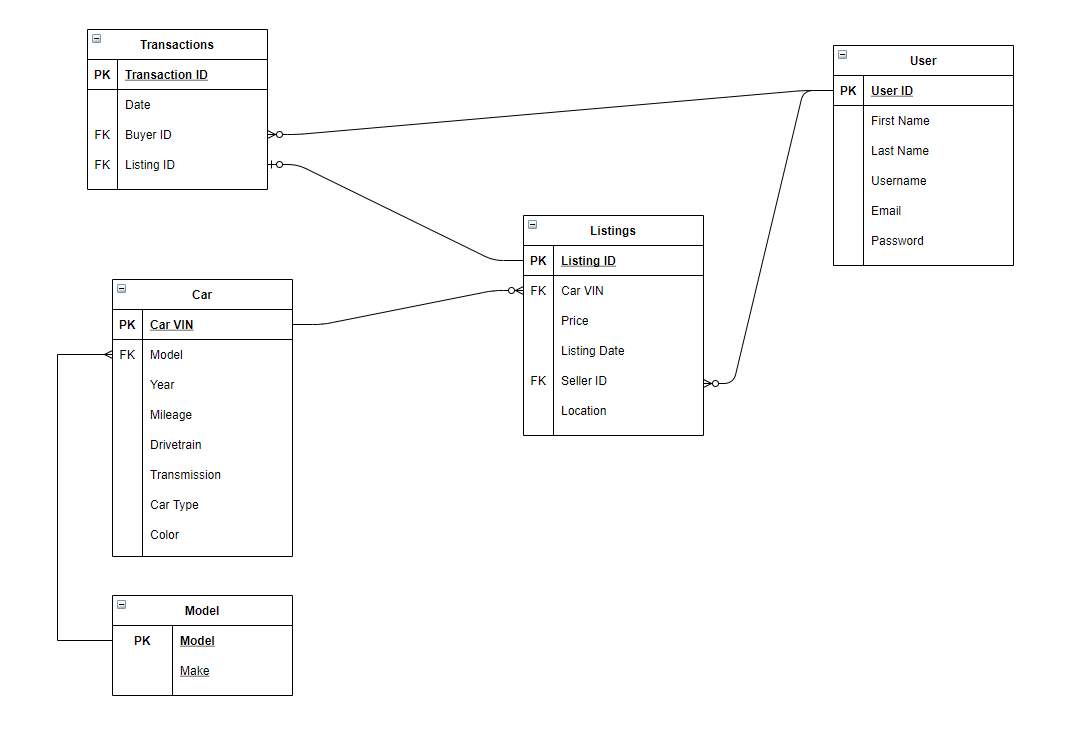
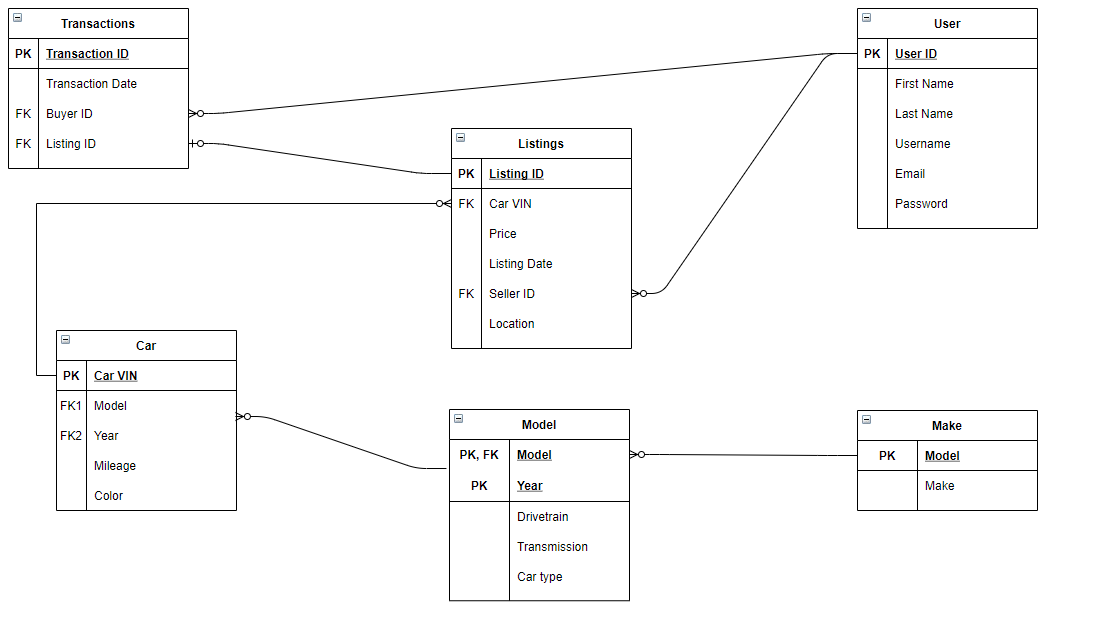
FROM Listings
INNER JOIN Users ON Users .userID = Listings .sellerID
INNER JOIN Cars ON Cars .vin = Listings .vin
INNER JOIN Models ON Models .model = Cars .model
INNER JOIN Models a ON a .year = Cars .year
INNER JOIN Makes ON Makes .model = Models .model ;Individual Listing for ListingID 1 SELECT Listings .listingID , Listings .price , Listings .location ,
Cars .vin , Makes .make , Cars .model , Cars .year , Cars .mileage ,
Users .userName
FROM Listings
JOIN Cars ON Cars .vin = Listings .vin
JOIN Users ON Users .userID = Listings .sellerID
JOIN Models ON Models .model = Cars .model
JOIN Models a ON a .year = Cars .year
JOIN Makes ON Makes .model = Models .model
WHERE Listings .listingID = 1 ;User 1's (Electrex's) Transactions SELECT Transactions .transactionID , Transactions .listingID , Transactions .buyerID , Transactions .transactionDate ,
Listings .sellerID , Listings .price
FROM Transactions
JOIN Listings ON Listings .listingID = Transactions .listingID
WHERE Listings .sellerID = 1 OR Transactions .buyerID = 1 ;User 1's (Electrex's) Listings SSELECT Listings .listingID , Listings .price , Listings .location ,
Cars .vin , Makes .make , Cars .model , Cars .year , Cars .mileage ,
Users .userName
FROM Listings
JOIN Cars ON Cars .vin = Listings .vin
JOIN Users ON Users .userID = Listings .sellerID
JOIN Models ON Models .model = Cars .model
JOIN Models a ON a .year = Cars .year
JOIN Makes ON Makes .model = Models .model
WHERE Listings .sellerID = 1 ; Option 1: Pull and run the pre-made docker image files (recommended)
Make sure you have docker installed
Setup the docker network, pull and run the images for the server and client in their isolated containers:
$ docker network create project
$ docker run -p 3001:3001 -d --network=project --name=node-server electrex/node-server:3.0
$ docker run -p 3000:3000 -d --network=project --name=react-client electrex/react-client:3.0
Once the project's containers are up and running, visit localhost:3000 in browser to access the application's UI
Option 2: Build and run the docker images yourself
Make sure you have docker installed
Pull the latest branch of the project's github repository:
$ git pull https://github.com/MerrillPE/cs157a-project.git
Open a new terminal window in the cloned repository's root directory and run the following:
$ docker-compose build
$ docker-compose up
Once the project's containers are up and running, visit localhost:3000 in browser to access the application's UI
MIT