Parametric furniture modeling for Fusion 360, driven by AI agents via MCP.
Describe a piece of furniture in natural language (or show a photo) and ShopPrentice generates a Fusion 360 parametric model, executes it live in Fusion via MCP, and iterates with you until it's right.
| Overview demo | Getting started tutorial |
|---|---|
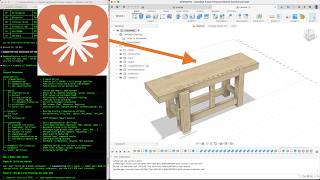 |
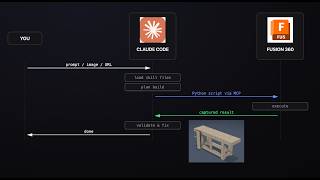 |
You: "Build a bar-height side table, 36" tall, 4 splayed legs, shelf stretchers with angled tenons"

ShopPrentice agent:
  1. Plans the build (components, features, joinery)
  2. Writes a parametric Fusion 360 Python script
  3. Executes it in Fusion 360 via MCP
  4. Validates with capture_design (body count, volumes, positions)
  5. Fixes any issues and re-executes
  6. Waits for the next prompt from you
Rectilinear dimensions are parameter-driven — change any value in the palette or in Modify > Change Parameters and those features recompute incrementally. Organic features (spline outlines, lofted sections, revolved profiles) carry baked fit-point coordinates instead of named dimensions; refine them by dragging control points in Fusion, or prompt the agent to reshape, and it re-bakes the captured points into the script.
One command — no clone needed:
curl -sSL https://raw.githubusercontent.com/ShopPrentice/shopprentice/main/install.sh | bashThis installs the woodworking skill for supported clients it detects, including Claude Code and Codex, and optionally sets up the MCP server for live Fusion 360 execution. For installer flags, OpenClaw users, and local clone installs, see DEVELOPMENT.md.
/woodworking
Build a 48" x 18" coffee table with tapered legs and a slatted top
In Codex, invoke the woodworking skill instead of using the Claude-style slash command.
The agent can also work from images — show it a photo or sketch of a piece and it will extract dimensions, proportions, and joint types to generate the parametric model.


The Step Stool and Pergola were reverse-engineered from existing Fusion 360 designs using the capture-and-rebuild pipeline (search-based feature matching with per-body volume validation at 0.000% tolerance).
Every rectilinear part — boards, cases, frames, rails, drawer boxes, square-stock legs, hardware cutouts — is built on a full Fusion 360 parametric timeline: Sketch > Constrain > Extrude, with Mirror/Pattern for symmetric replication and component structure for logical grouping. Every dimension is a named parameter expression, so the whole piece rebuilds when a palette value changes. This covers the bulk of most furniture.
Sculpted seats, turned legs, carved profiles, scooped surfaces, and lofted lens-profile bodies aren't driven by named dimensions — they're described by curves. ShopPrentice handles them via an approximate → refine → capture loop:
- Agent seeds the shape with a closed fitted spline (plan outline), a half-profile spline + Revolve (turned part), or a multi-section loft with rails (3-D organic solid).
- You refine interactively: drag fit points in the Fusion UI, or prompt the agent ("make the back edge narrower", "round the corner more").
- Agent captures edited fit points via
get_timeline_state(include_sketches=True)and bakes them back into the script as the new defaults — edits surviveclean=truerebuilds.
Supported organic techniques: revolved turned parts, closed-spline plan outlines, multi-section lofts with direction-tangent end conditions, rail-guided loft shaping, rounded apex tips (bullets/domes/eggs), spherical scoops, through-tenon trimming that follows curved surfaces. See docs/organic-shapes.md (shape taxonomy + inline recipes) and docs/loft.md (loft feature reference). The Esherick Stool example is the end-to-end showcase of the loop.
Dockable palette in Fusion 360 for iterating without Claude — edit parameters inline, click Rebuild (~14s), and changes write back to the .py file. Includes history with restore and a sync tab for capturing UI edits.
12 joint types with reusable Python templates: mortise & tenon, dovetail, box joint, domino, drawbore, dowel, dado/rabbet, lap, bridle, miter, spline, pocket hole. Plus hardware templates for bed rail fasteners and tabletop brackets.
All joinery uses the combine-based approach: build the tenon/tail as a body, CUT the receiving board, JOIN to the owner. See joinery/README.md for the full reference.
20+ built-in species from Fusion's library plus 5 custom high-res species (teak, brazilian rosewood, cocobolo, ziricote, spalted maple) with grain direction auto-aligned to each body's longest axis. Multi-species designs supported.
shopprentice/
  commands/            Canonical woodworking instructions + Claude Code entrypoint
  codex/               Codex skill wrapper(s)
  woodworking/         Skill topic files + joinery reference guides + templates
  helpers/             Standalone script library (sp.py)
  addin/               Fusion 360 add-in (MCP server + tools + parameter palette)
  woodgrain/           Custom wood textures
  examples/            Complete furniture projects with scripts + screenshots
  tools/               Utility scripts (search_build, generate, simulate)
  tests/               Round-trip test suite
cd ~/.shopprentice/repo && ./install.shSettings are in ~/.shopprentice/config.json (created on first install). Edit the file, then re-run the install command to apply.
{"screenshots": "none"}| Setting | Options | Default | Effect |
|---|---|---|---|
screenshots |
"none" |
"none" |
No screenshots — text validation only (most token-efficient) |
"final-only" |
Product shots once at the very end | ||
"every-step" |
Screenshot after each component (uses most tokens) |
Projects are saved to ~/shopprentice-projects/<project-name>/ with a script and README for each build.
- Advanced curved forms — bent laminations, cabriole legs, steam-bent backs, Chinese traditional furniture (sculpted organic solids, turned parts, scooped surfaces, and lofted bodies are already supported — see Organic Shapes above)
- More joinery — castle joint, sliding dovetail, Japanese joinery (mortise & tenon, dovetail, box joint, domino, drawbore, dowel, dado/rabbet, lap, bridle, miter, spline, pocket hole, and wedged tenon are already implemented)
- Output — cut lists, CNC toolpath hints, shop drawings
- Other CAD platforms — FreeCAD, Shapr3D, Onshape
- Image-to-model — better dimension extraction and 3D reconstruction from reference photos
MIT — see LICENSE.