My photography portfolio
This site is based off of pbsv.photo, the portfolio site of a photographer friend. He graciously allowed me to fork his code and use it for myself. Thanks!
Copy .env.example to .env and fill in your Cloudflare R2 credentials plus the public base URL for image assets:
PUBLIC_ASSET_BASE_URL=https://cdn.example.com
R2_ACCOUNT_ID=...
R2_ACCESS_KEY_ID=...
R2_SECRET_ACCESS_KEY=...
R2_BUCKET_NAME=...
R2_UPLOADS_DIR=uploads
PUBLIC_ASSET_BASE_URL is used at build time so Eleventy points to the R2 bucket instead of local files. When omitted the build falls back to /content/..., which only works if images still live in the repository.
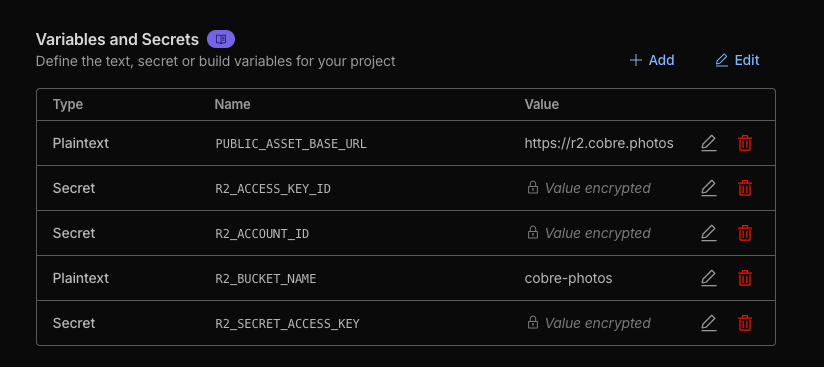
If you're deploying to Cloudflare Pages like I am, you'll also need to add all of those variables except for R2_UPLOADS_DIR to your Cloudflare Pages settings
- Stage new images inside
R2_UPLOADS_DIR/<type>/<folder>/where<type>iseventsorportfolioand<folder>matches the entry insrc/content/meta.json. You only need to include the files you want to add—previous images stay in R2. - Run
npm run sync:r2(ornode src/scripts/sync-r2.js). The script will:- Upload originals that are missing in R2.
- Generate and upload previews when they are absent.
- Update
src/content/gallery-manifest.jsonwith width, height, and file info so the site builds without requiring local originals.
- Commit the updated manifest and metadata changes. The images themselves stay out of git.
Tip
Use --dry-run to check what would be uploaded before actually syncing, and --type/--folder to narrow down a run:
npm run sync:r2 -- --dry-run --type events --folder 2025.10.17-wings-over-north-georgia
If you keep your upload staging area elsewhere, set R2_UPLOADS_DIR in .env (e.g. R2_UPLOADS_DIR=./cobre.dev/uploads) so the sync script picks it up automatically.
If you still have the full local catalog, you can backfill the manifest once with:
npm run build:manifest
After the manifest exists you can safely delete the local src/content/events and src/content/portfolio images from git—the build uses the manifest instead.
When you want to check a batch of images locally (either in src/content/... or your staged upload directory) you can generate the matching _preview.webp files without touching R2:
npm run previews:local
By default the script looks in the directory defined by R2_UPLOADS_DIR (falls back to uploads). Use flags to target specific folders:
npm run previews:local -- --dir src/content --type portfolio --folder aviation
Add --force when you need to regenerate previews even if the .webp already exists.
If you want tighter control over how photos appear inside a gallery, add an image_order
array to the corresponding entry in src/content/meta.json. List filenames (including
extensions) in your desired sequence:
{
  "title": "Aviation Highlights",
  "folder": "aviation",
  "image_order": [
    "DSC_1906.webp",
    "cobre.photos-0811-1014-4.webp",
    "DSC_0228.webp"
  ]
}
Any files you omit fall back to their existing order after the ones you list. The same property works for event galleries as well.