The BoS OS helps you understand and manage your company operating system.
Most companies add AI tools on top of an operating system nobody has written down. Strategy lives in the founder's head. Roles blur. Decisions don't stick. AI amplifies whatever's already there. Clarity becomes velocity; muddle becomes noise.
The Bootstrap skill fixes the foundation first.
Current version: v2.3.1
Bootstrap models your company OS from public information in under an hour.
It produces a first draft of your strategy layer, a map of your people and their roles, and decision governance. Your folder structure becomes your system. The files become the memory. Think of it as the AI doing its homework on your company before you meet. From there, the AI starts to understand your strategic goals, identify gaps, and surface opportunities and threats specific to your business.
This is the starting point. Run Bootstrap before anything else.
Bootstrap vs Workshop: Bootstrap creates a first draft from public information, fast, external, minimal input from you. Workshop refines that draft using your insider knowledge. Run Bootstrap first, then Workshop to make it real.
Every company already has an operating system. Most just don't know what's in it.
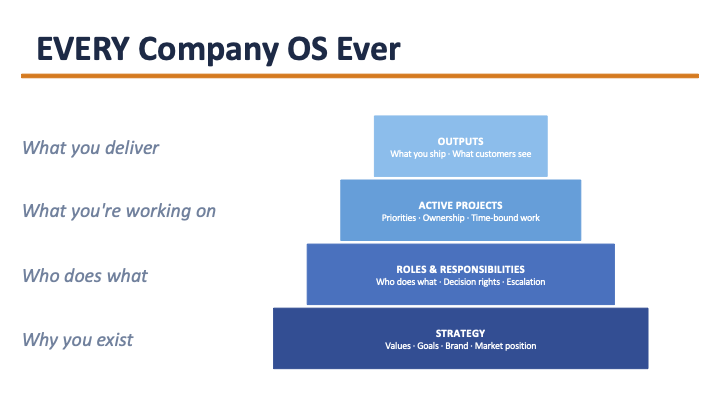
The BoS OS maps that structure, then gives AI a governed place inside it.
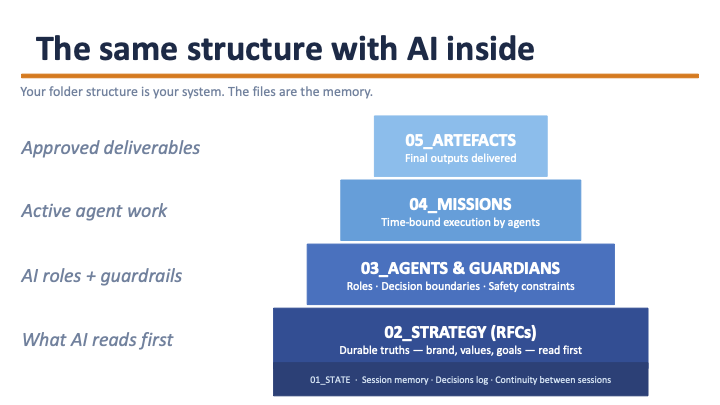
Your folder structure is your system. The files are the memory.
The Bootstrap skill file is maintained in the canonical repo:
Install from there. Full installation instructions are in that repo.
Important: Bootstrap must be run inside a Cowork project with a folder selected. If you run it from a general Claude conversation, files won't save and you'll need to start again. If you're unsure whether you're in a project, check the top of the Cowork window. You should see your selected folder name.
File storage: Your OS files live in whatever folder you selected when setting up Cowork. For safety, put that folder inside Dropbox, Google Drive, or another cloud sync service so your files are backed up and accessible from any machine.
Bootstrap produces a lot. Don't try to process it all at once. Do these four things before anything else:
- Read your CLAUDE.md and correct anything that's wrong. Pay particular attention to tone and terminology.
- Read your Values document and adjust it to sound like you, not like a consultant wrote it.
- Pick one strategy document that covers your biggest current challenge and spend 20 minutes with Workshop on that alone.
- Ignore everything else for now. The rest will still be there.
You can do this in chunks. It doesn't have to be one sitting. That said, most people find that once they start, they cancel the next meeting.
Once Bootstrap has produced your OS draft, use the Workshop skill to refine it.
- Workshop only - BoSOS-Workshop
- Bootstrap + Workshop together - BoS-OS-Start
Further skills, scheduled tasks, and agent specs are released on an ongoing basis.
Follow or watch this repo to get notified when new ones ship.
All BoSMark repos - github.com/BoSMark
Workshops, user groups, and community support:
businessofsoftware.org/updates
Subscribe for workshop announcements, guided cohorts, and peer community access.
Built by Tim Barker, Mark Littlewood and Business of Software - helping software founders build profitable, enduring companies since 2007.