
Open-source cross-agent memory layer for coding agents.
Tiered MCP support across Cursor, Claude Code, Codex, Windsurf, Gemini CLI, GitHub Copilot, Kiro, OpenCode, Antigravity, and Trae.





Three-Layer Memory | Agent Team | Workspace Sync | Multi-Agent Orchestration | Dashboard
Chinese | Quick Start | Docker | Supported Clients | Common Workflows | Documentation | Setup Guide
Using Memorix through Cursor, Windsurf, Claude Code, Codex, or another AI coding agent? Read the Agent Operator Playbook for the agent-facing install, MCP, hook, and troubleshooting rules.
Memorix is a local-first memory control plane for coding agents.
It keeps project memory, reasoning context, Git-derived facts, and optional autonomous-agent state in one place so you can continue work across IDEs, sessions, terminals, and agent runs without losing project truth.
For most users, the default path is simple: use the local TUI/CLI or connect one IDE over stdio MCP. Treat HTTP as the shared-control-plane mode you opt into when you specifically want one long-lived background service, shared MCP access, or a live dashboard endpoint.
Most coding agents remember only the current thread. Memorix gives them a shared, persistent memory layer across IDEs, sessions, and projects.
| 🧠 Three-Layer Memory | Observation (what/how), Reasoning (why/trade-offs), Git Memory (immutable commit-derived facts with noise filtering) |
| 🔍 Source-Aware Retrieval | "What changed" queries favor Git Memory; "why" queries favor reasoning; project-scoped by default, global on demand |
| ⚙️ Memory Quality Pipeline | Formation (LLM-assisted evaluation), dedup, consolidation, retention with exponential decay — memory stays clean, not noisy |
| 🔄 Workspace & Rules Sync | One command to migrate MCP configs, workflows, rules, and skills across Cursor, Windsurf, Claude Code, Codex, Copilot, Kiro, etc. |
| 👥 Agent Team | Opt-in autonomous-agent state: task board with role-based claiming, inter-agent messaging, advisory file locks, situational-awareness poll |
| 🤖 Multi-Agent Orchestration | memorix orchestrate runs a structured coordination loop — plan → parallel execution → verify → fix → review — with capability routing and worktree isolation |
| 📋 Session Lifecycle | Session start/end with handoff summaries, watermark tracking (new memories since last session), cross-session context recovery |
| 🎯 Project Skills | Auto-generate SKILL.md from memory patterns; promote observations to permanent mini-skills injected at session start |
| 📊 Dashboard | Local web UI for browsing memories, Git history, sessions, and read-only autonomous agent team state |
| 🔒 Local & Private | SQLite as canonical store, Orama for search, no cloud dependency — everything stays on your machine |
| Tier | Clients |
|---|---|
| ★ Core | Claude Code, Cursor, Windsurf |
| ◆ Extended | GitHub Copilot, Kiro, Codex |
| ○ Community | Gemini CLI, OpenCode, Antigravity, Trae |
Core = full hook integration + tested MCP + rules sync. Extended = hook integration with platform caveats. Community = best-effort hooks, community-reported compatibility.
If a client can speak MCP and launch a local command or HTTP endpoint, it can usually connect to Memorix even if it is not in the list above yet.
Install globally:
npm install -g memorixInitialize Memorix config:
memorix initmemorix init lets you choose between Global defaults and Project config.
Memorix uses two files with two roles:
memorix.ymlfor behavior and project settings.envfor secrets such as API keys
Then pick the path that matches what you want to do:
| You want | Run | Best for |
|---|---|---|
| Interactive terminal workbench | memorix |
Default starting point for local search, chat, memory capture, and diagnostics |
| Quick MCP setup inside one IDE | memorix serve |
Default MCP path for Cursor, Claude Code, Codex, Windsurf, Gemini CLI, and other stdio clients |
| Dashboard + shared HTTP MCP in the background | memorix background start |
A long-lived shared control plane for multiple clients and a live dashboard endpoint |
| Foreground HTTP mode for debugging or a custom port | memorix serve-http --port 3211 |
Manual supervision, debugging, custom launch control |
Most users should choose one of the first two options above. Move to HTTP only when you intentionally want one shared background service, multi-client MCP access, or a live dashboard endpoint.
Common paths:
| Goal | Use | Why |
|---|---|---|
| Work directly in the terminal | memorix or memorix <command> |
CLI/TUI is the primary product surface. |
| Connect an IDE or coding agent over MCP | memorix serve first; HTTP + memorix_session_start when needed |
Start a lightweight memory session without joining Agent Team by default. |
| Run autonomous multi-agent execution | memorix orchestrate |
Structured plan → spawn → verify → fix → review loop with CLI agents. |
| Watch project memory and agent state in the browser | memorix dashboard |
Standalone read-mostly dashboard for memory, sessions, and autonomous agent team state. |
Companion commands: memorix background status|logs|stop. For multi-workspace HTTP sessions, bind with memorix_session_start(projectRoot=...).
Deeper details on startup, project binding, config precedence, and agent workflows: docs/SETUP.md and the Agent Operator Playbook.
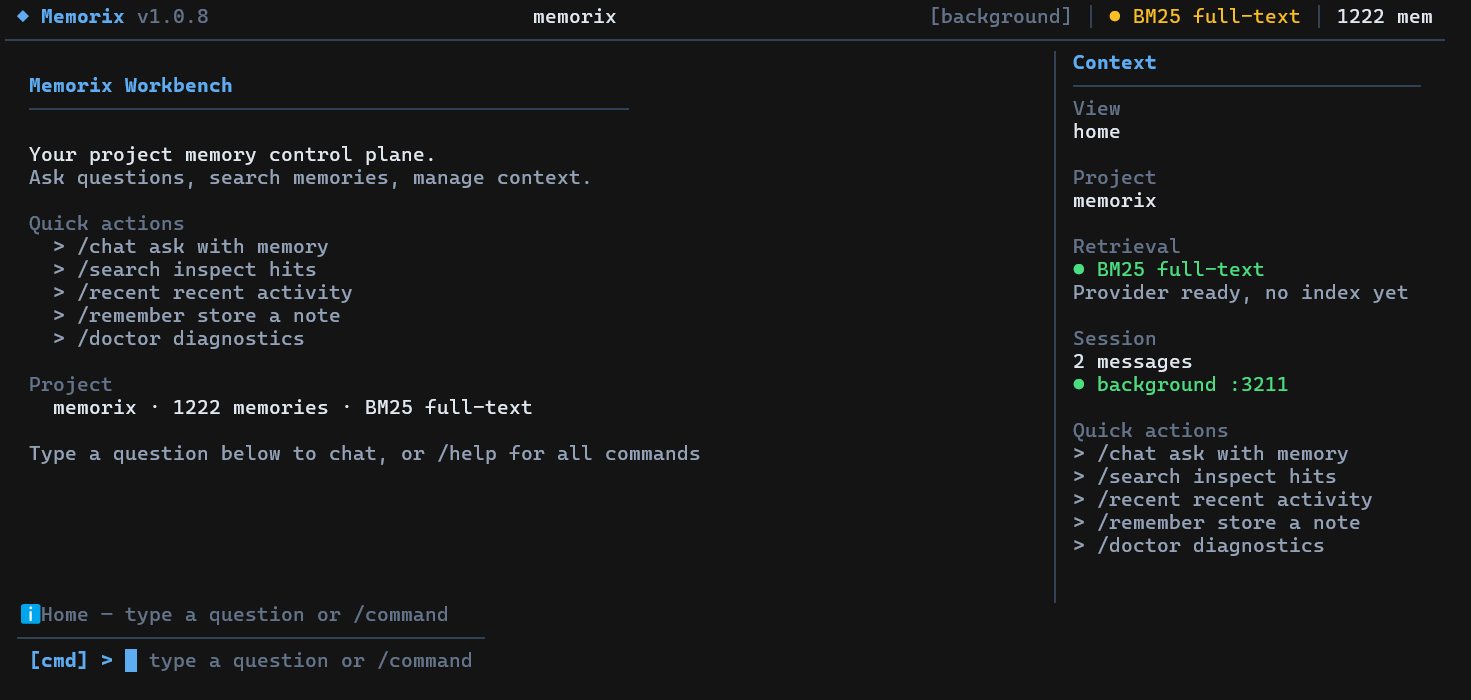
Running memorix without arguments opens an interactive fullscreen terminal UI (requires a TTY). Use it for chat with project memory, search, quick memory capture, diagnostics, background service control, dashboard launch, and IDE setup. Press /help inside the TUI for the current command list.
Single-shot chat (no TUI): memorix ask "your question".
Memorix exposes a CLI-first operator surface. Use it when you want to inspect or control the current project directly from a terminal. MCP remains the integration layer for IDEs and agents.
memorix session start --agent codex-main --agentType codex
memorix memory search --query "docker control plane"
memorix reasoning search --query "why sqlite"
memorix retention status
memorix team status
memorix task list
memorix audit project
memorix sync workspace --action scan
The CLI is intentionally task-shaped, not a 1:1 mirror of MCP tool names. Native capabilities are available through these namespaces: session, memory, reasoning, retention, formation, audit, transfer, skills, team, task, message, lock, handoff, poll, sync, ingest. MCP stays available for IDEs, agents, and optional graph-compatibility tools.
Memorix now includes an official Docker path for the HTTP control plane.
Quick start:
docker compose up --build -dThen connect to:
- dashboard:
http://localhost:3211 - MCP:
http://localhost:3211/mcp - health:
http://localhost:3211/health
Important: Docker support is for serve-http, not memorix serve. Project-scoped Git/config behavior only works when the container can see the repositories it is asked to bind.
Full Docker guide: docs/DOCKER.md
Add Memorix to your MCP client:
{
  "mcpServers": {
    "memorix": {
      "command": "memorix",
      "args": ["serve"]
    }
  }
}{
"mcpServers": {
"memorix": {
"transport": "http",
"url": "http://localhost:3211/mcp"
}
}
}The per-client examples below show the simplest stdio shape. If you prefer the shared HTTP control plane, keep the generic HTTP block above and use the client-specific variants in docs/SETUP.md.
Cursor | .cursor/mcp.json
{
  "mcpServers": {
    "memorix": {
      "command": "memorix",
      "args": ["serve"]
    }
  }
}
Claude Code
claude mcp add memorix -- memorix serveCodex | ~/.codex/config.toml
[mcp_servers.memorix]
command = "memorix"
args = ["serve"]
For the full IDE matrix, Windows notes, and troubleshooting, see docs/SETUP.md.
| You want to... | Use this | More detail |
|---|---|---|
| Save and retrieve project memory | memorix memory store/search/detail/resolve or MCP memorix_store/search/detail/resolve |
API Reference |
| Capture Git truth | memorix git-hook --force, memorix ingest commit, memorix ingest log |
Git Memory Guide |
| Run dashboard + HTTP MCP | memorix background start |
Setup Guide, Docker |
| Keep memory-only sessions lightweight | memorix_session_start(projectRoot=...) or memorix session start |
Agent Operator Playbook |
| Join the autonomous agent team | memorix session start --joinTeam or memorix team join |
TEAM.md, API Reference |
| Run autonomous multi-agent work | memorix orchestrate --goal "..." |
API Reference |
| Sync agent configs/rules | memorix sync workspace ..., memorix sync rules ... |
Setup Guide |
| Use Memorix from code | import { createMemoryClient } from 'memorix/sdk' |
API Reference |
The most common loop is deliberately small:
memorix memory store --text "Auth tokens expire after 24h" --title "Auth token TTL" --entity auth --type decision
memorix memory search --query "auth token ttl"
memorix session start --agent codex-main --agentType codex
When multiple HTTP sessions are open at once, each session should bind itself with memorix_session_start(projectRoot=...) before using project-scoped memory tools.
HTTP MCP sessions idle out after 30 minutes by default. If your client does not automatically recover from stale HTTP session IDs, set a longer timeout before starting the control plane:
MEMORIX_SESSION_TIMEOUT_MS=86400000 memorix background start # 24hAgent Team is not the normal memory startup path and it is not a chat room between IDE windows. Join only when you need tasks, messages, locks, or a structured autonomous-agent workflow. For real multi-agent execution, prefer:
memorix orchestrate --goal "Add user authentication" --agents claude-code,cursor,codexMemorix is designed to stay light during normal memory use:
- stdio MCP starts on demand and exits with the client
- HTTP background mode is one local Node process plus SQLite/Orama state
- LLM enrichment is optional; without API keys, Memorix falls back to local heuristic dedup/search
- the heavier paths are build/test, Docker image builds, dashboard browsing, large imports, and optional LLM-backed formation
On this Windows development machine, the healthy HTTP control plane was observed at about 16 MB working set after several hours idle. Treat that as a local observation, not a cross-platform guarantee. See Performance and Resource Notes for knobs and trade-offs.
Import Memorix directly into your own TypeScript/Node.js project — no MCP or CLI needed:
import { createMemoryClient } from 'memorix/sdk';

const client = await createMemoryClient({ projectRoot: '/path/to/repo' });

// Store a memory
await client.store({
  entityName: 'auth-module',
  type: 'decision',
  title: 'Use JWT for API auth',
  narrative: 'Chose JWT over session cookies for stateless API.',
});

// Search
const results = await client.search({ query: 'authentication' });

// Retrieve, resolve, count
const obs = await client.get(1);
const all = await client.getAll();
await client.resolve([1, 2]);

await client.close();
Three subpath exports:
| Import | What you get |
|---|---|
memorix/sdk |
createMemoryClient, createMemorixServer, detectProject, all types |
memorix/types |
Type-only — interfaces, enums, constants |
memorix |
MCP stdio entry point (not for programmatic use) |

Memorix is not a single linear pipeline. It accepts memory from multiple ingress surfaces, persists it across multiple substrates, runs several asynchronous quality/indexing branches, and exposes the results through retrieval, dashboard, and explicit Agent Team surfaces.
- Observation Memory: what changed, how something works, gotchas, problem-solution notes
- Reasoning Memory: why a choice was made, alternatives, trade-offs, risks
- Git Memory: immutable engineering facts derived from commits
- Default search is project-scoped
scope="global"searches across projects- Global hits can be opened explicitly with project-aware refs
- Source-aware retrieval boosts Git memories for "what changed" questions and reasoning memories for "why" questions
📖 Docs Map — fastest route to the right document.
| Section | What's Covered |
|---|---|
| Setup Guide | Install, stdio vs HTTP control plane, per-client config |
| Docker Deployment | Official container image path, compose, healthcheck, and path caveats |
| Performance | Resource profile, idle/runtime costs, optimization knobs |
| Configuration | memorix.yml, .env, project overrides |
| Agent Operator Playbook | Canonical AI-facing guide for installation, binding, hooks, troubleshooting |
| Architecture | System shape, memory layers, data flows, module map |
| API Reference | MCP / HTTP / CLI command surface |
| Git Memory Guide | Ingestion, noise filtering, retrieval semantics |
| Development Guide | Contributor workflow, build, test, release |
Additional deep references:
- Memory Formation Pipeline
- Design Decisions
- Modules
- Known Issues and Roadmap
- AI Context Note
llms.txtllms-full.txt
Version 1.0.8 builds on the 1.0.7 coordination/storage/team baseline with a CLI-first operator surface, official Docker path, dashboard refinements, and broad hooks fixes.
- CLI-First Product Surface: Every Memorix-native operator capability now has a task-oriented CLI route —
session,memory,reasoning,retention,formation,audit,transfer,skills,team,task,message,lock,handoff,poll,sync,ingest. MCP remains the integration protocol and optional graph-compatibility layer. - Docker Deployment: Official
Dockerfile,compose.yaml, healthcheck,--hostbinding, and DOCKER.md for running the HTTP control plane in a container. - Multi-Agent Orchestrator:
memorix orchestrateruns plan, parallel execution, verification, fix, review, and merge loops across Claude, Codex, Gemini CLI, and OpenCode with capability routing, worktree isolation, and agent fallback. - SQLite Canonical Store: Observations, mini-skills, sessions, and archives in SQLite. Shared DB handle, freshness-safe retrieval, dead
JsonBackendremoved. - Opt-in Agent Team: task board, messages, file locks, handoff artifacts, and autonomous-agent heartbeat state.
session_startis lightweight by default; team identity is opt-in viajoinTeamorteam_manage join. - Dashboard Semantic Layering: Team page filter tabs (Active/Recent/Historical), de-emphasized historical agents, project switcher grouped by real/temporary/placeholder, identity page cleanup.
- Hooks Fixes: OpenCode event-name key mapping +
Bun.spawn→spawnSync; Copilotpwshfallback + global-hooks guard; hook handler diagnostic logging. - Programmatic SDK:
import { createMemoryClient } from 'memorix/sdk'to store, search, get, and resolve observations directly from your own code without MCP or CLI. Also exportscreateMemorixServeranddetectProject. - Test Suite Stabilization: E2e and live-LLM tests are excluded from the default suite, and load-sensitive tests are isolated so the default verification path stays deterministic.
git clone https://github.com/AVIDS2/memorix.git
cd memorix
npm install

npm run dev
npm test
npm run build
Key local commands:
memorix status
memorix dashboard
memorix background start
memorix serve-http --port 3211
memorix git-hook --forceMemorix builds on ideas from mcp-memory-service, MemCP, claude-mem, Mem0, and the broader MCP ecosystem.