Releases: magento/pwa-studio
v11.0.0

Release 11.0.0
NOTE:
This changelog only contains release notes for PWA Studio and Venia 11.0.0.
For older release notes, see [PWA Studio releases][].
Table of contents
- What's new in 11.0.0
- Pull requests merged in this release
- Known issues
- Upgrading from a previous version
What's new in 11.0.0
PWA Studio 11.0.0 contains new features, refactors, bug fixes, and various improvements.
This version is compatible with Magento 2.4.3.
Wish List
Started in PWA Studio 9.0.0 with basic features and functionality, Wish List is feature complete in this release and implemented in the Venia storefront template.
This feature gives shoppers the ability to create and manage lists of items they may want to purchase in the future using Wish List specific components and logic.
The following Wish List features have been implemented in this release:
- Add an item to a wish list from the product page
- Add an item to a wish list from the category page
- Add an item to a wish list from the cart page
- Add an item to the cart from a wish list
- Support for multiple wish lists
- Edit the name and visibility of a wish list
Pull Requests
| Description | PR |
|---|---|
| Removed the use of mock data for Wish List and connected to real GraphQL data | #3041 |
| Implemented adding an item to a Wish List from the product page | #3048 |
| Implemented the ability to edit a Wish List's name and visibility | #3049 |
| Implemented adding an item to a Wish List from the category page | #3105 |
| Fixed a Wish List bug that prevented you from removing a product if the Wish List had 2 or more products | #3121 |
| Implemented adding an item to a Wish List from the cart | #3130 |
| Implemented adding an item to the cart from a Wish List | #3170 |
| Created a re-usable hook for Wish List logic for re-use in various components | #3182 |
| Fixed a Wish List bug that allowed users to collapse the Wish List section when it only had a single entry | #3184 |
| Implemented adding an item from the cart to multiple wishlists | #3207 |
| Added message to display when the Wish List is empty | #3228 |
| Fixed a Wish List bug in the Create Wish List dialog that prevented users from creating a new Wish List | #3242 |
| Cleaned up Multi Wish List code | #3246 |
| Created a single Wish List button component to use throughout the application | #3249 |
Virtual Product types
This release contains initial work to support Virtual Product types.
In this initial implementation, you can browse and view Virtual Product types in your storefront, but
you will not be able to add these types to the cart.
Pull Requests
| Description | PR |
|---|---|
| Implemented ability to browse and view Virtual Products types | #3052 |
Extensible payment methods
Two new extensions points for the Venia UI package have been added in this release.
The editablePaymentTypes target lets you add new editable payment methods to your storefronts, and
the summaryPagePaymentTypes target lets you add a custom payment summary in the checkout summary page.
Pull Requests
| Description | PR |
|---|---|
| Refactored payment methods and created new extension points | #3103 |
Accessibility
Keyboard focus and navigation now work as expected on the layered navigation UI feature.
With the Filter modal open, users can press the Tab key to navigate across filter items such as "Price" and "Color".
On filter items, the user can press Space to open and navigate through the options with Tab.
Options are toggled using the Space key.
| Description | PR |
|---|---|
| Added keyboard focus and adjusted the way tab order should work | #3034 |
Layered Navigation
To help deliver a better customer experience, filtering products by their attributes on the product listing page has been optimized for desktop views.
The changes included in this release focuses on improving how the user interacts with the layered navigation feature when filtering products.
For example, filter options can be neatly collapsed and the product listing is automatically updated whenever the user selects a filter option.
Pull Requests
| Description | PR |
|---|---|
| Optimized the layered navigation feature for the desktop | #3137 |
Performance and optimization updates
This release also contains a configuration change for UPWARD so that it can use the gzip content encoding for HTML requests.
Pull Requests
| Description | PR |
|---|---|
Configured UPWARD to use gzip content encoding for HTML requests |
#3255 |
Documentation updates
Since the last release, the documentation site has published new topics and updated an existing topic.
New topics
- Upgrading versions
- Change static assets directory
- Extension development
- Modify code with Targetables
- Targetable API reference
Updated topics
Pull Requests
| Description | PR |
|---|---|
| Published a new topic that provides guidance and best practices for upgrading to new versions | [#3231][] |
| Published a new tutorial that shows how you can change the static assets directory used in your project | [#3219][] |
| Reorganize and refactor the navigation for the Overview sections | [#2926][] |
| Published a new topic that provides general guidance for extension development ... |
v10.0.0

Release 10.0.0
NOTE:
This changelog only contains release notes for PWA Studio and Venia 10.0.0.
For older release notes, see [PWA Studio releases][].
Table of contents
- What's new in 10.0.0
- Pull requests merged in this release
- Known issues
- Upgrading from a previous version
What's new in 10.0.0
PWA Studio 10.0.0 contains new features, refactors, bug fixes, and various improvements.
This version is compatible with Magento 2.4.2.
Build report tool
The build report tool is a Buildpack CLI command that returns information about a storefront setup and development environment.
This feature makes it easier to provide information when reporting issues or for general debugging purposes.
The following command is now available for newly scaffolded projects:
yarn build:report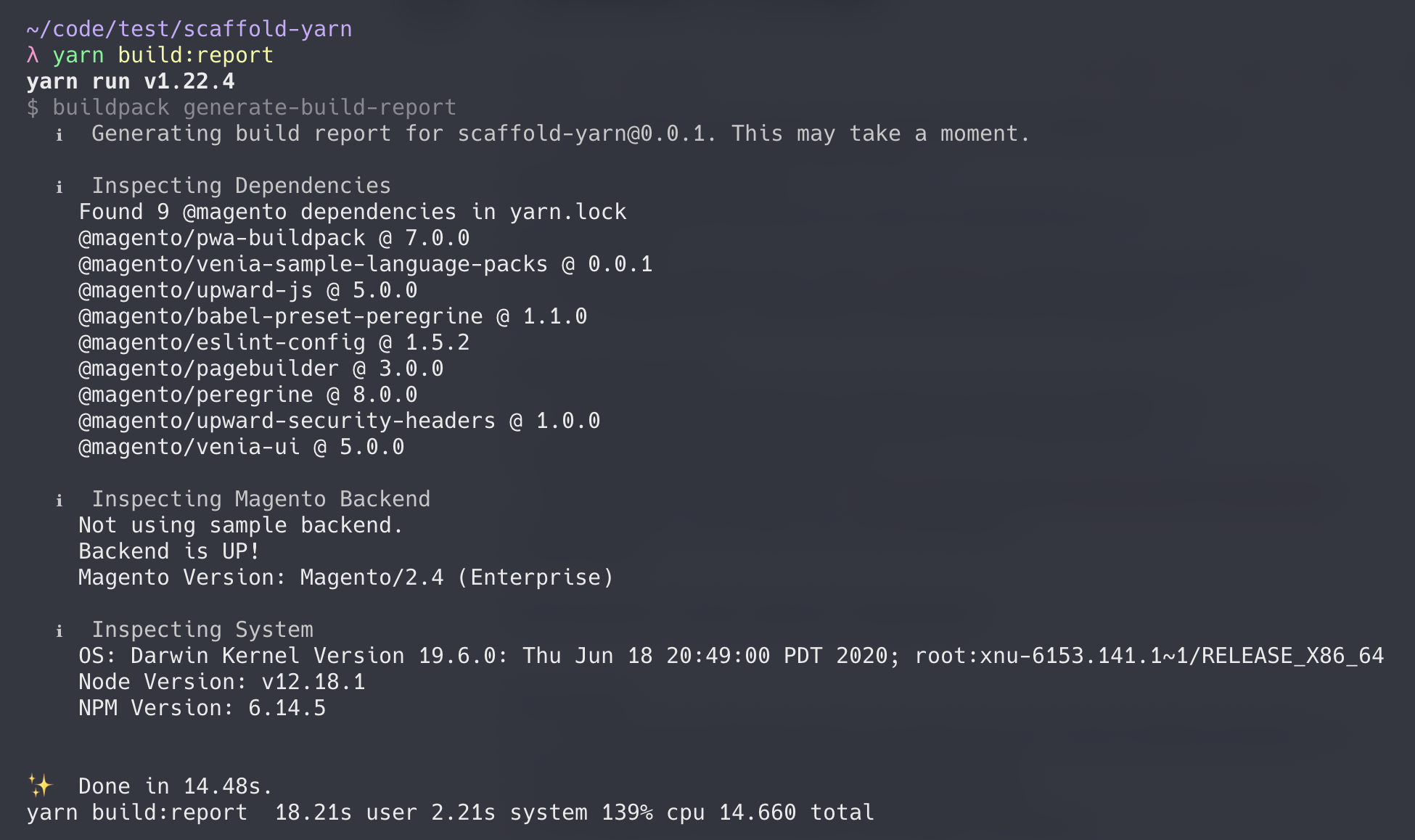
Check or Money Order payments
A PWA Studio extension that allows check or money order payments is now available thanks to the contribution of community member Lars Roettig.
If the Magento backend has the Check or Money Order option enabled, this extension lets storefront customers use this payment option.
Storefront developers can install this extension to add the new payment feature instead of writing custom frontend code to support this feature.
Extension developers can view the extension's source code to learn how to implement their own payment methods extension.
NOTE:
Currently, the data for Make Check Payable to and Send Check to is static because data from the Admin is not available from the GraphQL endpoint in Magento 2.4.2.

Custom scaffolding template
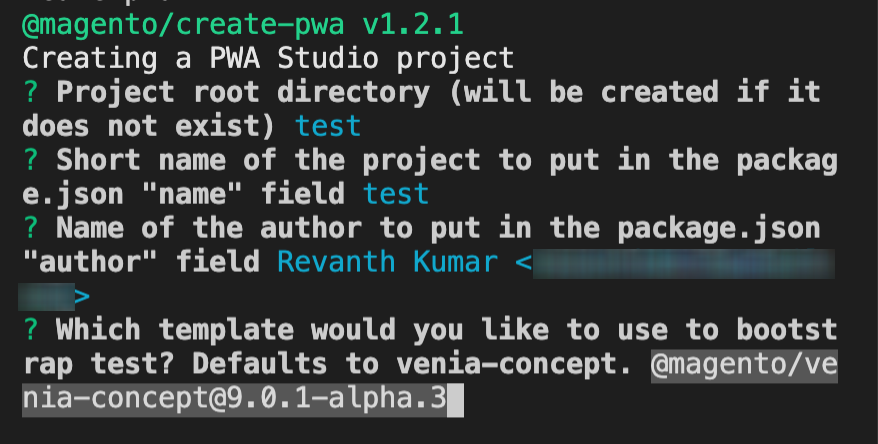
The Buildpack scaffolding tool for creating new projects now lets you specify a custom template and version.
This feature lets you create a storefront project based on a non-Venia template or use a pre-release version of the Venia template.
MegaMenu component
A MegaMenu component is now available in the Venia UI library thanks to the contribution of community member Marcin Kwiatkowski.
This component displays product categories and subcategories defined in the Magento backend.

Store switcher
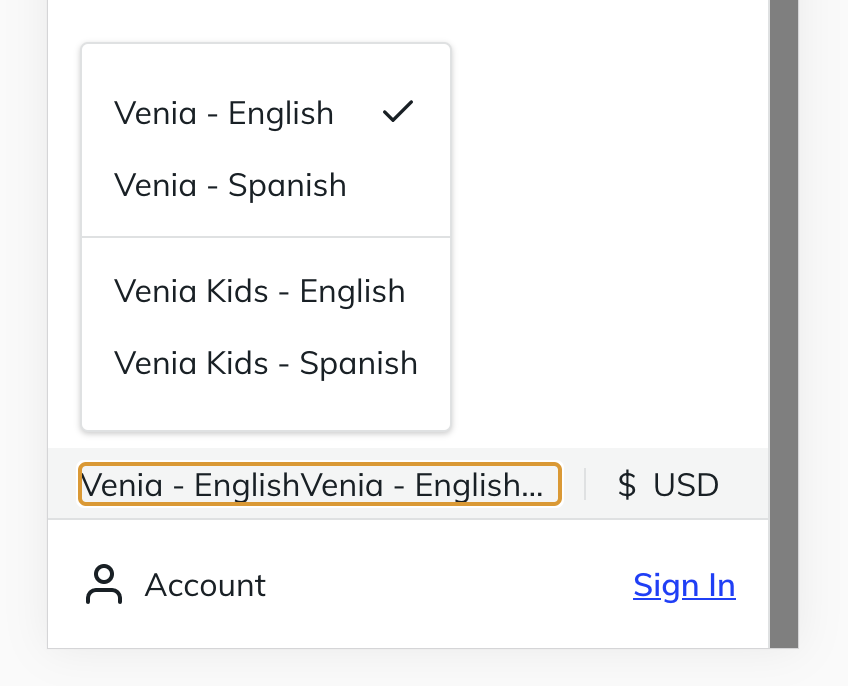
The Venia UI library now provides components that support multiple store views.
These components let customers switch between the different store views defined in the Magento backend.
These components also support grouped store views if available from Magento.
Improved performance
This release improves the performance of the Venia storefront and its underlying components.
These improvements include:
- Enabling text compression for the UPWARD-JS server
- Removing unused JavaScript in Venia
- Investigating and improving render blocking and response in Venia
Increased test coverage
Our continued commitment to stability and quality has seen an increase in overall unit test code coverage.
Coverage as reported by coveralls.io:
Current coverage (10.0.0): 85.685%
Previous coverage (9.0.1): 84.19%
Pull requests merged in this release
Venia (storefront and visual component library)
| Description | Change type | PR |
|---|---|---|
| Added MegeMenu feature and components | Feature | [#2932][] |
| Added ability to lazy Load/trim unused bytes in main routes | Feature | [#2988][] |
| Implemented Check or Money Order payment feature | Feature | [#2969][] |
| Added support for Configurable Product Image setting in the backend | Feature | [#2958][] |
| Created Store Switcher Groups components | Feature | [#2956][] |
| Added ability to remove saved payment methods | Feature | [#2943][] |
| Created ErrorView components | Feature | [#2936][] |
| Created Debugging Reporter feature | Feature | [#2910][] |
| Added link click handler inside of GalleryItem | Feature | [#3053][] |
Excluded venia-ui/lib/components/Checkout from Coverage Report |
Update | [#3023][] |
Increased test coverage for venia-ui/lib/components/CreateAccountPage |
Update | [#3021][] |
Increased test coverage in venia-ui/lib/components/CheckoutPage |
Update | [#3018][] |
| Created Venia UI App related tests | Update | [#3015][] |
| Removed "Home Page" from Title | Update | [#3012][] |
Increased test coverage in venia-ui/lib/components/MagentoRoute |
Update | [#3006][] |
Increased test coverage in venia-ui/lib/components/Main |
Update | [#3004][] |
| Removed data from all persisted Apollo caches | Update | [#2992][] |
| Investigated and improved render/blocking in Venia | Update | [#2952][] |
| Fixed mini cart not updating when logged in user has the same simple product already added | Bugfix | [#2996][] |
| Fixed CMS header line height | Bugfix | [#3032][] |
| Fixed bug where default Toasts do not fall back to using the DEFAULT_TIMEOUT | Bugfix | [#2982][] |
| Fixed a bug where dialog component would not reset fields on close after submitting | Bugfix | [#2960][] |
| Set a fixed minimum height on the main page | Bugfix | [#2942][] |
| Added a page level error and disabled checkout button when there are no available payment methods | Bugfix | [#2873][] |
Peregrine library
| Description | Change type | PR |
|---|---|---|
| Added middleware to schedule sign-out | Feature | [#2904][] |
| Added support for Product URL and Category URL Settings | Feature | [#2895][] |
Increased test coverage for packages/peregrine/lib/talons/CheckoutPage |
Update | [#3024][] |
Increase test coverage in peregrine/lib/talons/SignIn |
Update | [#2998][] |
| Updated Media Url generation logic to use store code header with a default fallback value | Update | [#2941][] |
| Moved Price Summary GraphQL fragment into Peregrine | Refactor | [#3007][] |
| Refactor comment on cmsPage talon to reflect why we compare against default string | Refactor | [#3062][] |
| Cleaned up an invalid function reference in billing address | Refactor | [#3065][] |
Build tools
| Description | Change type | PR |
|---|---|---|
| Added ability to use custom template for scaffolding | Feature | [#3025][] |
| Added option to use custom https certificates with buildpack | Feature | [#2946][] |
| Updated compile time logic to fetch store name from the GraphQL server | Update | [#3019][] |
Fixed command escaping in the create-pwa shell command |
Bugfix | [#3022][] |
UPWARD
| Description | Change type | PR |
|---|---|---|
| Added support for express server compression middleware. | Feature | [#2980][] |
Added ability to allow blob types for UPWARD security headers |
Feature | [#2985][] |
| Added the xfwd option to the proxyMiddleware | Feature | [#2986][] |
Extensions
| Description | Change type | PR |
| --...
v9.0.1
Release 9.0.1
NOTE:
This changelog only contains release notes for PWA Studio and Venia 9.0.1.
For older release notes, see PWA Studio releases.
Table of contents
- What's new in 9.0.1
- Pull requests merged in this release
- Known issues
- Upgrading from a previous version
What's new in 9.0.1
PWA Studio 9.0.1 contains the same features, refactors, and various improvements in the previous 9.0.0 release plus a hotfix for the create-pwa CLI tool.
Hotfix for create-pwa
This release fixes a bug that crashes the scaffolding tool whenever you run yarn create @magento/pwa or npx @magento/create-pwa.
Pull requests merged in this release
Build tools
| Description | Change type | PR |
|---|---|---|
| Removed lodash from create-pwa | Bugfix | #3003 |
| Added venia-concept as a dependency of create-pwa | Bugfix | #3008 |
Known issues
- If you are using Multi-Source Inventory(MSI), a GraphQL issue prevents users from adding a configurable product to the shopping cart on non-default store views.
- Prerender feature is unable to cache HTML on Fastly enabled environments.
- The
yarn watchprocess may run out of memory if left running for an extended amount of time.
If an error occurs because of this, restart the watcher.
Upgrading from a previous version
The method for updating to 9.0.1 from a previous version depends on how PWA Studio is incorporated into your project.
The following are common use cases we have identified and how to update the project code.
Scaffolded project
Using the scaffolding tool is the recommended method for starting a new storefront project.
This tool generates a copy of the storefront project defined in the Venia concept package.
Upgrade method: Update dependencies and manual merge
Since scaffolded projects consume PWA Studio libraries as dependencies, you just need to update your PWA Studio dependencies in your package.json file to use the released version.
After that, install the new dependencies using the install command:
yarn installor
npm installIf you need to update other project files, such as configuration and build scripts,
you need to use a diff tool to compare your projects files with those of Venia concept.
This will help determine what changes you need to manually copy into your project files.
PWA Studio fork
Many PWA Studio users have forked the PWA Studio Git repository.
Even though their codebase may have diverged a great deal from the current codebase, there is still a Git relationship.
Upgrade method: Update using Git
Pull and Merge the changes from the upstream repository using Git.
Most of the conflicts will be in components that we have fully refactored.
We recommend merging the library code we changed and updating component calls with any new prop signatures introduced in this version.
Manual code copies
Some PWA Studio users have copied parts of the code into their own projects.
This is similar to the Git workflow, but without the merging tools Git provides.
Upgrade method: Manual copy updates
Updating this code involves manually copying updates for the code they use.
New code may also need to be copied over if the updated code depends on it.
This method can be a chore, and we hope that some of the features in 5.0.0+ will help these users migrate to a package management approach.
NPM packages
Some users have imported the PWA Studio libraries using NPM.
This is the easiest way to work with the released versions of PWA Studio.
Upgrade method: Update package.json
To upgrade to the latest version (currently 9.0.1), simply call yarn add on each of the @magento packages. This will both update package.json in your project, as well as install the latest versions.
Sample command:
yarn add @magento/eslint-config @magento/pagebuilder @magento/peregrine @magento/pwa-buildpack @magento/upward-js @magento/venia-ui
v9.0.0
Release 9.0.0
NOTE:
This changelog only contains release notes for PWA Studio and Venia 9.0.0.
For older release notes, see [PWA Studio releases][].
Table of contents
- What's new in 9.0.0
- Pull requests merged in this release
- Known issues
- Upgrading from a previous version
What's new in 9.0.0
PWA Studio 9.0.0 contains new features, refactors, and various improvements.
IMPORTANT:
Due to an issue with the scaffolding tool released in 9.0.0, we released 9.0.1 quickly to resolve this issue.
Extensibility framework improvements
This release adds several improvements to the extensibility framework in PWA Studio to make it easier for developers to customize their storefronts.
For an overview of this framework, check out the new Extensibility framework topic on the docs site.
In previous releases, Peregrine talons had limited Target coverage.
This release adds an automatic API generator to Peregrine that exposes all hooks and talons as Targets.
Now, existing and future hooks and talons in Peregrine automatically get their own Targets API that developers may use to modify or extend functionality.
This release also adds the Targetables feature to the extensibility framework.
These represent source files used in your PWA Studio project, and
they give developers the ability to change the source code during the build process.
With Targetables, developers no longer have to copy PWA Studio source code into their storefront projects to make minor modifications.
PWA Studio extensions
PWA Studio's extensibility framework lets developers create extensions and install them as project dependencies in their storefronts.
As part of the work on the new extensibility framework, we refactored and relocated existing Venia features into PWA Studio extensions.
We also developed new extensions that provide useful Venia features that developers can add to their projects.
The source code for these extensions are available under the packages/extensions directory in the PWA Studio repository.
upward-security-headers
: intercepts build targets to add security headers to UPWARD
venia-adobe-data-layer
: provides Adobe Client Data Layer support for your project
venia-sample-backends
: provides demo Magento backends and backend validation utilities for your project
(this extension should be removed prior to going live)
venia-sample-language-packs
: provides example translations to illustrate how new languages can be installed into your storefronts
Internationalization and localization
The internationalization(i18n) feature in PWA Studio lets developers localize their storefront content according to different regions and languages.
The Magento backend provides your storefront with this list of regions and languages and the I18n feature provides translated content using PWA Studio language pack extensions.
As part of the i18n feature work, we refactored Venia UI components and gave them the ability to display the correct translations for multi-language storefronts.
This release also gives developers the ability to develop and install PWA Studio language packages as NPM dependencies.
An example of a language pack extension is in the packages/extensions directory in the PWA Studio repository.
For more information, read the new topic on the Localization feature.
My Account
This release adds components that support My Account features for customers that create an account with a store.
My Account features included in this release:
- Wishlist
- Saved Payments
- Address Book
- Order History
Increased test coverage
Our continued commitment to stability and quality has seen an increase in overall unit test code coverage.
Coverage as reported by coveralls.io:
Current coverage (9.0.0)
: 84.19%
Previous coverage (8.0.0)
: 79.21%
Magento release support change
Previous releases of PWA Studio supported multiple versions of the Magento back-end.
To help us deliver value faster, we modified our support matrix.
Starting with PWA Studio & Venia 9.0.0, we will only support the most recent version of Magento.
For example, version 9.0.0 only supports Magento 2.4.2.
Minor versions of PWA Studio & Venia released between typical Magento releases will support the last publicly available release.
Pull requests merged in this release
Venia (storefront and visual component library)
| Description | Change type | PR |
|---|---|---|
| Created UI skeleton for Saved Payments | Feature | [#2671][] |
| Created component for displaying account information | Feature | [#2672][] |
| Added ability for shoppers to change locale using a store view switcher | Feature | [#2686][] |
| Created the main view for Wishlist | Feature | [#2692][] |
| Added the expanded view in the order history table | Feature | [#2703][] |
| Created a currency switcher component | Feature | [#2728][] |
Added USE_STORE_CODE_IN_URL environment variable configuration |
Feature | [#2735][] |
| Created Wishlist UI | Feature | [#2766][] |
| Added ability to determine whether to unmount or just hide child components in the Dialog component | Feature | [#2767][] |
| Added ability to remove products from Wishlist | Feature | [#2793][] |
| Added a "maskable icon" to Venia for Google Lighthouse | Feature | [#2818][] |
| Created message to display when no allowed or configured payment methods are present | Feature | [#2855][] |
| Created the main view for Address Book in My Account | Feature | [#2857][] |
| Added ability to Add and Edit addresses in the Address Book | Feature | [#2879][] |
| Created the main view for Saved payment methods | Feature | [#2882][] |
| Added ability to delete Address from Address Book | Feature | [#2888][] |
| Created new Sign In view for Checkout flow | Feature | [#2889][] |
| Updated logic for routes handling to accept an array of paths | Feature | [#2893][] |
| Replaced hardcoded root category id with an actual value retrieved from a query | Feature | [#2902][] |
| Added search by order number feature to the order history page | Feature | [#2916][] |
| Added pagination for Order History | Feature | [#2928][] |
| Refactored Edit Payment to use Dialog component | Refactor | [#2806][] |
| Refactored Edit Product to use Dialog component | Refactor | [#2824][] |
| Refactored Payment feature to make it extendable | Refactor | [#2838][] |
Added access to checkout's useOverview() talon |
Update | [#2636][] |
| Updated the Search trigger button in the site header to behave like My Account and Cart trigger buttons | Update | [#2685][] |
| Replaced the ProductQuantity component on the Product page with a QuantityFields stepper component | Update | [#2690][] |
| Localized My Account and Signed In sidebar | Update | [#2721][] |
| Localized Mini Cart and Search | Update | [#2734][] |
| Localized Cart | Update | [#2740][] |
| Localized Checkout page | Update | [#2759][] |
| Localized CMS | Update | [#2764][] |
| Localized Category page | Update | [#2771][] |
| Localized Product page ... |
v8.0.0
Release 8.0.0
NOTE:
This changelog only contains release notes for PWA Studio 8.0.0.
For older release notes, see [PWA Studio releases][].
Table of contents
- What's new in 8.0.0
- Pull requests merged in this release
- Known issues
- Upgrading from a previous version
What's new in 8.0.0
PWA Studio 8.0.0 contains new features, refactors, and various improvements.
Improved performance
A lot of work has been done in this release to improve storefront performance.
This means that any project using the latest PWA Studio components will benefit from these updates.
One of the bigger changes is the migration to Apollo Client 3.0.
This version of the Apollo Client provides better cache controls and better network fetching performance in general.
This release also includes various refactors and improvements on the GraphQL queries themselves to reduce the API request times from Magento.
Complete cart and checkout experience
This release finishes the full page cart and checkout features introduced in previous releases.
The complete cart and checkout workflow is based on research made by members of the UX team.
Storefront developers can use this streamlined process as implemented or they can use the different components to customize their own cart and checkout workflow.
Shopping Bag feature
In addition to the complete full page cart and checkout experience, this release introduces a new Mini-Cart/Shopping Bag feature.
This feature is a floating modal that appears when you click on the shopping bag icon.
It replaces the old MiniCart component, which previously appeared as a drawer from the right side of the app.
Instead of competing with the full page cart feature, it only contains a subset of actions, such as removing an item and checking out.
For additional modifications to cart products, it links to the cart page.
Developers can still use the old MiniCart component in their projects, but it has been renamed to LegacyMiniCart.
Branding updates
The UX team continues in their research to improve the look and feel of the Venia brand.
This release includes many style updates to give the Venia storefront a more modern and accessible experience.
Developers get all these improvements right away when they start their projects using this version of Venia as the base storefront or by upgrading their dependencies.
My Account code preview
This releases includes a sneak peak at features associated with My Account, such as Wishlist, Order History, and Address Book.
Even though the Communications Page is the only navigable page, curious developers can peek at the 8.0.0 release codebase to see the initial code for these features.
Targets reference documentation
During 8.0.0 development, the PWA Studio doc site has published reference documentation for extensibility targets in the different packages.
This documentation contains API descriptions and sample code to help developers discover the different PWA Studio extension points.
Pull requests merged in this release
Venia (storefront and visual component library)
| Description | Change type | PR |
|---|---|---|
| Implemented initial code for the new MiniCart component | Feature | [#2494][] |
| Created new components for an account menu | Feature | [#2550][] |
| Created components for a Newsletter Subscription page | Feature | [#2571][] |
| Implemented initial code for an Order History page | Feature | [#2611][] |
| Implemented a way to access top/intermediate level categories through the left nav | Feature | [#2616][] |
| Implemented initial UX and workflow for a Forgot Password feature for My Account | Feature | [#2619][] |
| Implemented initial code for Wishlist | Feature | [#2620][] |
| Implemented the ability to translate Venia's header / footer | Feature | [#2643][] |
| Added ability to allow PWA Studio to use a different store to localize CMS Pages | Feature | [#2649][] |
| Implemented initial code for Address Book | Feature | [#2653][] |
| Implemented initial code for an Order History table | Feature | [#2660][] |
| Updated Venia's button style to match new design | Update | [#2496][] |
| Added product listing to the MiniCart | Update | [#2506][] |
| Added a header section to the MiniCart | Update | [#2509][] |
| Added a footer section to the MiniCart | Update | [#2511][] |
| Adjusted styles for the header, main page, and footer components | Update | [#2513][] |
Update Gallery component to use item.id for key prop on GalleryItem |
Update | [#2520][] |
| Added product link for each product in the MiniCart | Update | [#2549][] |
| Disabled the visibility of the MiniCart on the checkout page | Update | [#2554][] |
| Added product links to the product listings on the cart page | Update | [#2557][] |
| Updated Venia's filter modal styles to match the new design | Update | [#2559][] |
| Added CSS to handle multiple configurable options | Update | [#2577][] |
| Implemented consistent error state handling | Update | [#2588][] |
| Added a sign-in section to the new My Account trigger in the header | Update | [#2590][] |
| Enabled GET for GraphQL queries (but not mutations) | Update | [#2602][] |
| Added React Refresh to improve development server performance | Update | [#2609][] |
| Improved error handling when using the Sign-in dropdown | Update | [#2664][] |
| Updated static images to reflect new logo | Update | [#2693][] |
| Disabled account page routes for v8.0.0 | Update | [#2709][] |
| Removed email from the reset password link | Update | [#2726][] |
| Refactored code to use tokens for color and weight | Refactor | [#2500][] |
| Refactored Venia's inputs to match new design | Refactor | [#2510][] |
| Refactored Venia's accordions to match the style guidelines | Refactor | [#2527][] |
| Refactored Venia's cards to match the style guidelines | Refactor | [#2545][] |
| Fixed a "Data Fetch Error" on the product page during offline mode | Bugfix | [#2490][] |
| Fixed a bug that made the product and category sorting component unavailable | Bugfix | [#2493][] |
| Resolved remaining issues with Buttons component implementation | Bugfix | [#2523][] |
| Fixed scroll lock page shifting | Bugfix | [#2543][] |
| Fixed MiniCart blocking page interactions | Bugfix | [#2547][] |
| Fixed a sticky sidebar on the checkout page overlapping the footer | Bugfix | [#2582][] |
| Fixed a bug that kept rendering the loading spinner on the page | Bugfix | [#2583][] |
| Fixed MiniCart bug that prevent guest users from adding a product to an expired cart | Bugfix | [#2612][] |
| Fixed button CSS to handle mobile view | Bugfix | [#2655][] |
Fixed improper use of formatMessage() |
Bugfix | [#2698][] |
| Fixed Storybook bug caused by i18n work | Bugfix | [#2705][] |
| Fixed Payment Information button to disable it while the Payment section loads | Bugfix | [#2723][] |
| Fixed an offline homepage error | Bugfix | [#2727][] |
Peregrine library
| Description | Change type | PR |
|---|---|---|
| Added access to the root component type for child components | Feature | [#2443][] |
| Enable URL redirects when set in the Magento backend | Feature | [#2504][] |
| Added Create Account functionality to the Sign-in trigger in the navigation menu | Feature | [#2657][] |
| Added support for an app-wide configurable URL suffix | Feature | [#... |
v7.0.0
Release 7.0.0
NOTE:
This changelog only contains release notes for PWA Studio 7.0.0.
For older release notes, see [PWA Studio releases][].
Table of contents
- What's new in 7.0.0
- Pull requests merged in this release
- Known issues
- Upgrading from a previous version
What's new in 7.0.0
PWA Studio 7.0.0 contains new features, refactors, and various improvements.
Extensibility framework
This release improves on the extensibility framework introduced in version 6.0.0.
It introduces new extension points for the Buildpack, Peregrine, and Venia UI library components.
Developers can use these extension points to extend their storefront project without duplicating and maintaining PWA-Studio code.
As of 7.0.0, PWA-Studio contains the following extension points:
Venia UI extension points
Venia UI extension points are declared in [venia-ui-declare.js][].
| Target name | Description |
|---|---|
richContentRenderers |
Add custom rich content renderers to your storefront |
routes |
Add or modify storefront-specific routes |
Peregrine extension points
Peregrine extensions points are declared in [peregrine-declare.js][].
| Target name | Description |
|---|---|
talons |
Intercept specific Peregrine talons and wrap them with your custom components |
Wrappable talons:
useProductFullDetail()useApp()
Buildpack extension points
Buildpack extension points are declared in [declare-base.js][].
| Target name | Description |
|---|---|
enVarDefinition |
Add custom environment variables to PWA-Studio's environment variables system |
transformModules |
Apply custom file transformers through webpack |
webpackCompiler |
Access the webpack compiler object |
specialFeatures |
Specify special features to the webpack compiler for components |
New Venia look
Release 7.0.0 introduces numerous improvements to the shopper experience with various stylistic changes to the Venia example storefront.
These storefront changes are the result of extensive research by the UX team to provide an optimal shopping experience.
These improvements are available to developers as individual library components or as a whole when they set up a new storefront project.
Page Builder home page
In addition to the style changes for Venia, release 7.0.0 also adds a new home page built using [Page Builder][].
The content of this CMS page is defined in the Magento Admin using the Page Builder extension.
It showcases Page Builder content types such as Sliders, Banners, and Gallery Items.
This new page replaces the old home page content in Venia.
Check out the new Venia homepage
Standalone Cart and Checkout pages
This release builds on the standalone Shopping Cart page introduced in 6.0.0 and connects it to a new standalone Checkout page.
Developers can use these pages as starting points in their storefront projects or use the new components developed for those pages in their own solutions.
These pages are still under development as of this release, but you can view the current progress at:
https://develop.pwa-venia.com/cart
Order Confirmation page
This release adds an Order Confirmation page at the end of the cart and checkout workflow.
It contains the billing and shipping information specified during checkout along with the items ordered.
This page works with guest and authenticated checkout.
For guest checkout, the shopper is given the option to create an account for the store.
Standard Dialog component
This release introduces a standard modal window with the [Dialog component][].
Modals are child windows that render over the main application.
They are highly visual components that show important messages or prompts for user interactions.
The Dialog component introduced in this release provides a standard way of working with this modal windows.
This guarantees a unified look and feel for all your modal window use cases.
PWA Studio Fundamentals tutorials
Over the course of 7.0.0 development, the PWA Studio doc site has published introductory tutorials for working with the PWA-Studio tools and libraries.
These tutorials provide steps for common tasks associated with storefront development.
They cover everything from setting up the initial project to providing a checklist for deploying to production.
See [PWA Studio fundamentals][] for a list of these tutorials.
Pull requests merged in this release
Venia (storefront and visual component library)
| Description | Change type | PR |
|---|---|---|
| Created a new Portal component | Feature | [#2436][] |
Added support for png image requests for servers that cannot handle webp |
Feature | [#2400][] |
| Implemented UX around $0 total checkout | Feature | [#2394][] |
| Implemented auto-population of shipping information when authenticated | Feature | [#2380][] |
| Implemented shopping cart merging on login | Feature | [#2377][] |
| Added ability to specify ratio for image component | Feature | [#2372][] |
| Implemented Checkout page price adjustments | Feature | [#2366][] |
| Created a new Dialog Component | Feature | [#2365][] |
| Added Storybook to Venia concept for scaffolded projects | Feature | [#2355][] |
| Added a new CMS home page with Page Builder content | Feature | [#2345][] |
| Implemented a guest payment workflow on the Checkout page | Feature | [#2320][] |
Enabled the RadioGroup component to pass rest attributes to radio group items |
Feature | [#2313][] |
| Added sorting to search page | Feature | [#2294][] |
| Created new Order Confirmation page | Feature | [#2288][] |
| Created Items Review component for Cart and Checkout | Feature | [#2257][] |
| Added property to specify the cart trigger color | Feature | [#2220][] |
| Updated home page route | Update | [#2565][] |
| Renamed identities to be culturally appropriate | Update | [#2478][] |
| Updated Cart page to show loading state while fetching data from network | Update | [#2454][] |
| Updated cache policy for Home page | Update | [#2453][] |
| Swapped usage of React Head to React Helmet Async | Update | [#2412][] |
| Updated Service Worker to be more strict when doing catalog image checks | Update | [#2392][] |
| Removed reference related to recently viewed items | Update | [#2387][] |
Changed the accordion section buttons to type button |
Update | [#2335][] |
| Changed the Venia loading spinner image to a simpler CSS spinner | Update | [#2310][] |
Added check for the isRequired validation rule |
Update | [#2303][] |
| Implemented Shipping Information form for guest checkout | Update | [#2285][] |
| Added Shipping Methods form to Checkout page | Update | [#2280][] |
| Made minor updates to the Order Summary feature | Update | [#2278][] |
| Styled icons with CSS | Update | [#2272][] |
| Added the Order Summary to the Checkout page | Update | [#2271][] |
| Cleaned and made Cart and Checkout pages consistent | Update | [#2258][] |
| Updated Checkout page GraphQL query | Update | [#2254][] |
| Added category description (with PageBuilder support as well) in the category view | Update | [#2226][] |
| Updated cms component to include meta data | Update | [#2159][] |
| Changed the random swatch color to the actual color | Update | [#... |
v6.0.1
Release 6.0.1
NOTE:
This changelog only contains release notes for PWA Studio 6.0.1.
For older release notes, see PWA Studio releases.
Table of contents
What's new in 6.0.1
PWA Studio 6.0.1 contains a hotfix for the scaffolding generator.
This release fixes an error generated by the scaffolding generator when you run the create-project command directly.
See PR #2363 for additional details.
Upgrading from a previous version
The method for updating to 6.0.1 from a previous version depends on how PWA Studio is incorporated into your project.
The following are common use cases we have identified and how to update the project code.
PWA Studio fork
Many PWA Studio users have forked the PWA Studio Git repository.
Even though their codebase may have diverged a great deal from the current codebase, there is still a Git relationship.
Upgrade method: Update using Git
Pull and Merge the changes from the upstream repository using Git.
Most of the conflicts will be in components that we have fully refactored.
We recommend merging the library code we changed and updating component calls with any new prop signatures introduced in this version.
Manual code copies
Some PWA Studio users have copied parts of the code into their own projects.
This is similar to the Git workflow, but without the merging tools Git provides.
Upgrade method: Manual copy updates
Updating this code involves manually copying updates for the code they use.
New code may also need to be copied over if the updated code depends on it.
This method can be a chore, and we hope that some of the features in 5.0.0+ will help these users migrate to a package management approach.
NPM packages
Some users have imported the PWA Studio libraries using NPM.
This is the easiest way to work with the released versions of PWA Studio.
Upgrade method: Update package.json
To upgrade to 6.0.1, update the project's package.json file and change the version string for any PWA Studio package dependencies.
v6.0.0

Release 6.0.0
NOTE:
This changelog only contains release notes for PWA Studio 6.0.0.
For older release notes, see [PWA Studio releases][].
Table of contents
What's new in 6.0.0
PWA Studio 6.0.0 contains new features, refactors, and various improvements.
Initial extensibility framework
This release contains initial work for an extensibility framework in PWA Studio.
This framework gives developers the ability to create an extensibility API for their storefront or write plugins that can tap into those API and modify storefront logic.
An example of this framework in action can be found in the Venia storefront, which exposes an API and installs the Page Builder PWA package as a dependency.
Previously the only way to add Page Builder features was to have a copy of the Page Builder module's source code inside the project itself.
This had the unfortunate side effect of you having to manually apply any code changes to your copy of Page Builder whenever a new version releases.
With the new extensibility framework, updating is as easy as installing the new version.
Caching and data fetching improvements
This release contains improved caching logic and other data fetching optimizations in the Peregrine and Venia UI component libraries.
These components have been refactored to take advantage of Apollo cache features to reduce overfetching or prevent the storage of sensitive data.
Shopping cart page components
This release adds components that can be used for a full page shopping cart experience.
The standalone cart page for Venia is still under development as of this release, but you can view the current progress at: https://develop.pwa-venia.com/cart
PWA Studio tutorials
Since the last release, the PWA Studio doc site has created a new tutorial section for PWA Studio fundamentals.
Topics in this section will be more instructional than the topics found in the Getting started section.
Currently, the following drafts have been published (with more to come):
Thanks to community member rossmc for contributing the drafts for this these topics!
Pull requests merged in this release
Venia (storefront and visual component library)
| Description | Change type | PR |
|---|---|---|
| Added current applied Gift Card balance to UI | Feature | [#2156][] |
| Added "Edit Item" feature from mini-cart into Cart Page kebab menu | Feature | [#2191][] |
| Added an error toast for invalid Product quantities | Feature | [#2196][] |
| Created initial skeleton for a checkout page | Feature | [#2181][] |
| Implemented sorting for Category page | Feature | [#2133][] |
| Added Gift Cards support to Cart page | Feature | [#2124][] |
| Added Shipping Method to Cart page | Feature | [#2123][] |
| Added a product quantity stepper to cart items | Feature | [#2115][] |
| Added Gift options support in cart page | Feature | [#2114][] |
| Added intermediate level breadcrumbs | Feature | [#2113][] |
| Added Cart Coupons functionality | Feature | [#2108][] |
| Added Cart Price Summary to cart page | Feature | [#2092][] |
| Created new ProductListing Component for cart page | Feature | [#2094][] |
| Added PriceAdjustments and Accordion components to cart page | Feature | [#2090][] |
| Created a standalone Cart Page | Feature | [#2084][] |
| Removed client-side Email Validation on Signin, Create Acount, and Forgot Password forms | Update | [#2157][] |
| Refactored JSX in some modules to follow standards for conditionals | Refactor | [#2200][] |
Refactored usage of isFastNetwork() in service worker. |
Refactor | [#2193][] |
| Refactored Accordion component to close sections instead of unmounting them | Refactor | [#2149][] |
| Refactored ErrorView to be more scalable | Refactor | [#2116][] |
| Refactored cart style to fit design intent | Refactor | [#2104][] |
| Created Firefox-specific CSS to fix text alignment issues | Bugfix | [#2233][] |
| Fixed Email field validation bug in Billing Information by removing field | Bugfix | [#2216][] |
| Fixed style for quantity field/steppers in Firefox | Bugfix | [#2206][] |
| Fixed Cart page sign out error when cart does not exist in cache | Bugfix | [#2189][] |
| Fixed a bug in the Cart page where items showed incorrect configurable options | Bugfix | [#2167][] |
| Fixed a bug related to search trigger focus | Bugfix | [#2165][] |
| Fixed venia-static files not loading out-of-the box with scaffolding command | Bugfix | [#2143][] |
| Fixed the incorrect export for PriceSummaryQuery | Bugfix | [#2142][] |
| Fixed incorrect cart page title | Bugfix | [#2140][] |
| Updated informed version to fix Windows 10/Edge issues | Bugfix | [#2129][] |
| Fixed bug that rendered price components when cart is empty | Bugfix | [#2112][] |
| Fixed validator for venia-ui | Bugfix | [#2095][] |
| Fixed search result counts not matching in different components | Bugfix | [#2037][] |
Peregrine library
| Description | Change type | PR |
|---|---|---|
| Enabled mutation queueing to prevent race conditions when multiple mutations are in flight | Feature | [#2215][] |
| Adds validation and input trimming for Gift Card input field | Feature | [#2175][] |
| Enabled real Filtering functionality by connect to GraphQL | Feature | [#2166][] |
| Refactored Apollo cache use to prevent overfetching | Refactor | [#2250][] |
| Removed mutation PII while still updating the cache correctly | Refactor | [#2240][] |
| Fixed a bug with the breadcrumbs in the Product Details Page talon for products without categories | Bugfix | [#2224][] |
| Fixed bug that showed stale suggestions during searches | Bugfix | [#2150][] |
| Fixed Accordion talon bugs that kept resetting sections | Bugfix | [#2147][] |
Page Builder plugin
| Description | Change type | PR |
|---|---|---|
| Re-implemented Page Builder as an extension | Feature | [#2137][] |
| Added support for Page Builder's Video Background feature | Feature | [#2187][] |
| Fixed video alignment background in embedded videos | Bugfix | [#2201][] |
| Fixed bug that would cause extensions utilizing Page Builder to break when upgraded | Bugfix | [#2199][] |
| Fixed bug where Row Full-Width contents were horizontally positioned incorrectly in desktop | Bugfix | [#2146][] |
| Fixed escaped HTML bug that broke the HTML content type | Bugfix | [#2283][] |
Build tools
| Description | Change type | PR |
|---|---|---|
| Added interception targets for environmental variables | Feature | [#2174][] |
| Add ability to conditionally ... |
v5.0.1
Release 5.0.1
NOTE:
This changelog only contains release notes for PWA Studio 5.0.1.
For older release notes, see PWA Studio releases.
Table of contents
What's new in 5.0.1
PWA Studio 5.0.1 is a patch release to fix an Image loading issue and cache persistence issue.
Pull requests merged in this release
Venia (storefront and visual component library)
| Description | Change type | PR |
|---|---|---|
| Fix images not loading correctly | Bugfix | #2164 |
Peregrine library
| Description | Change type | PR |
|---|---|---|
| Prevent invalid mutation caching | Bugfix | #2176 |
Upgrading from a previous version
The method for updating to 5.0.1 from a previous version depends on how PWA Studio is incorporated into your project.
The following are common use cases we have identified and how to update the project code.
PWA Studio fork
Many PWA Studio users have forked the PWA Studio Git repository.
Even though their codebase may have diverged a great deal from the current codebase, there is still a Git relationship.
Upgrade method: Update using Git
Pull and Merge the changes from the upstream repository using Git.
Most of the conflicts will be in components that we have fully refactored.
We recommend merging the library code we changed and updating component calls with any new prop signatures introduced in this version.
Manual code copies
Some PWA Studio users have copied parts of the code into their own projects.
This is similar to the Git workflow, but without the merging tools Git provides.
Upgrade method: Manual copy updates
Updating this code involves manually copying updates for the code they use.
New code may also need to be copied over if the updated code depends on it.
This method can be a chore, and we hope that some of the features in 5.0.0 will help these users migrate to a package management approach.
NPM packages
Some users have imported the PWA Studio libraries using NPM.
This is the easiest way to work with the released versions of PWA Studio.
Upgrade method: Update package.json
To upgrade to 5.0.1, update the project's package.json file and change the dependency version for PWA Studio.
v5.0.0
Release 5.0.0
NOTE:
This changelog only contains release notes for PWA Studio 5.0.0 and above.
For older release notes, see [PWA Studio releases][].
Table of contents
What's new in 5.0.0
PWA Studio 5.0.0 contains new features, refactors, breaking changes, and various improvements.
Page Builder integration
Page Builder is a content creation tool developed by Magento.
It allows merchants to define store layouts using the Admin panel.
Page Builder integrating with PWA Studio means merchants may now use Page Builder to define the layout in the Magento backend and have that content rendered in a PWA Studio storefront.
This release makes the Venia RichContent component compatible with the default Page Builder content types.
Scaffolding
Getting a new PWA Studio project up and running is now easier with the @magento/create-pwa command.
This command is a user-friendly version of the create-project sub-command in the pwa-buildpack CLI tool.
Use this command to set up an initial project structure using the Venia storefront as a template.
It provides an interactive questionnaire to help configure the different parts of your project.
For more information see: Scaffolding
Talons
This release introduces the concept of Peregrine Talons.
Peregrine Talons are a set of React Hooks tailored for a specific UI component.
They contain logic for calculating the values rendered by its companion UI component.
Separating the logic and the presentational pieces of a component lets developers swap out either piece when creating custom UI components.
For more information see: Peregrine Talons
New route handler
Routing in the project has been updated to use the React Router library instead of a custom router.
The following is a summary of these changes:
- The new
Routescomponent replacesrenderRoutes() - The new
MagentoRoutecomponent replacesMagentoRouteHandler - The new
useMagentoRoute()Talon replacesMagentoRouteHandler
State management refactors
This release refactors the way PWA Studio handles state management in Venia.
Instead of using Redux directly, Peregrine now provides a set of context providers and Hooks to interact with the different slices of state in the global data store.
For more information, read State management
REST to GraphQL migration
With the increase in GraphQL coverage in the latest Magento release (2.3.4), PWA Studio continues to refactor out REST usage in favor of GraphQL.
Various usage of REST have been converted to GraphQL.
These changes include the various cart interactions, sign-in/sign-out, and fetching country data.
For more information on GraphQL, see: GraphQL Developer Guide
Performance improvements
A lot of work has been done in this release to improve the performance provided by PWA Studio tools and libraries.
Service worker improvements
Service worker changes in this release provides smarter use of the cache and when to invalidate stale data.
Other improvements include more optimized bundles/images and route handling.
Optimized images
Handling images on the storefront has been improved in this release.
Storefronts are now able to load the optimal image for a given viewport.
New features such as pre-fetching and lazy loading also boosts page load performance.
Refactoring classes to functional components
This release refactors various classes into functional components.
This was done to align with the move towards using React Hooks throughout the project.
Breadcrumbs
The breadcrumb feature has been added to Venia's product and category pages.
Use this feature to improve navigation in your storefronts.
Potential breaking changes
Since this is a major release, some of the changes previously listed may break projects dependent on PWA Studio and its tools and components.
These changes include:
- Refactoring to produce Talons have modified the public API of some Venia components
- Converting from REST to GraphQL calls
- Optimizing images required updates that modify how images should be used
- Converting classes to functional components to use React Hooks
- Replacing
MagentoRouteHandlerwith new component and Talon
Pull requests merged in this release
Venia (storefront and visual component library)
| Description | Change type | PR |
|---|---|---|
| Added meta descriptions to root pages | Feature | [#2035][] |
| Added email validation to ForgotPasswordForm | Feature | [#1997][] |
| Improved performance by lazy loading AuthModal | Feature | [#1955][] |
| Improved performance by lazy loading Category filters | Feature | [#1971][] |
| Improved Image fit with Fastly | Feature | [#1976][] |
| Added product page breadcrumbs | Feature | [#1960][] |
| Added category page breadcrumbs | Feature | [#1949][] |
| Improved product page caching | Feature | [#1935][] |
| Added PageBuilder components | Feature | [#1872][] |
Implemented the apollo-link-retry Link |
Feature | [#1799][] |
| Created component for showing categories with no products | Feature | [#1496][] |
| Updated template HTML to include noscript fallback | Update | [#2034][] |
Removed id from getCustomer response object |
Update | [#2028][] |
| Added Email validation in signin form | Update | [#1981][] |
| Added support for Carousel appearance for Product content type | Update | [#1951][] |
| Updated static to venia-static | Update | [#1932][] |
| Upgraded Apollo View layer to Hooks | Update | [#1827][] |
Improved efficiency of the getNavigationMenu query |
Update | [#1867][] |
| Added field labels for inputs | Update | [#1845][] |
| Update mixin references to Talon | Update | [#1820][] |
| Deleted unused home component | Update | [#1798][] |
| Implemented route-based code splitting | Update | [#1765][] |
| Updated Swatch Treatments | Update | [#1512][] |
| Added support for initial selections on the Edit Item screen | Update | [#1592][] |
| Replaced connected components with context Hooks | Update | [#1664][] |
| Removed sticky attribute from the pagination | Update | [#1735][] |
Replaced rem to pixels in the height and width attribute for the pagination image |
Update | [#1738][] |
| Refactored checkout workflow to set shipping address/get shipping methods with GraphQL | Refactor | [#2018][] |
Refactored code to use updateItem mutations |
Refactor | [#2017][] |
| Refactored code to use GraphQL for adding items to cart | Refactor | [#1987][] |
Replaced REST endpoing for cart item removal with a removeItemFromCart mutation |
Refactor | [#2015][] |
| Refactor code to revoke customer token using GraphQL mutation on sign out | Refactor | [#2012][] |
| Refactor code to use GraphQL mutation to create/fetch cartId. | Refactor | [#1988][] |
Removed test.only from test file |
Refactor | [#1989][] |
| Refactor components to fetch Countries from GraphQL instead of REST | Refactor | [#1993][] |
| Replaced sign-in REST with GraphQL | Refactor | [#1904][] |
| Standardized GraphQL files with 4-space indentation | Refactor | [#1914][] |
Replaced the create-account REST endpoint with the createCustomer GraphQL mutation |
Refactor | [#1898][] |
Removed redux.compose() where not needed ... |