Description:
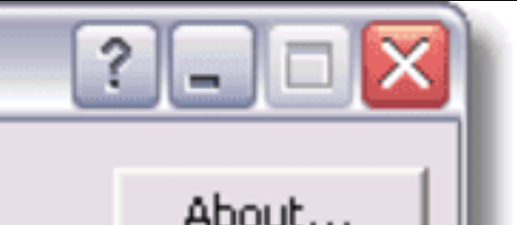
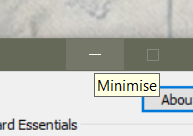
The help button image is missing in Windows 10/11 and is overlapping the minimalize button. The invisible help button can still be triggered by holding, once triggered it becomes very difficult to minimalize the window, needing to be pressed at the rightermost pixels of the minimalize button to fix.
Steps To Reproduce
- Open iPodWizard as administrator
- Hold the minimalize ' - ' logo within the button button for 2-3 seconds
- Observe the bug, the help dialog menu has now appeared.
- Close the help dialog
- Press the minimalize ' - ' logo within the button as if trying to minimalize the app
- Observe the related bug, the button will usually only show the help dialog after triggering the first bug
- Press the rightermost pixels of the minimalize button.
- It will now minimalize and act as normal again.
Repro rate: 5/5
Affected Version(s): v1.3, v1.4e
Attachments:
This is the intended outcome for Windows Vista/7
This is the actual outcome on Windows 10

Description:
The help button image is missing in Windows 10/11 and is overlapping the minimalize button. The invisible help button can still be triggered by holding, once triggered it becomes very difficult to minimalize the window, needing to be pressed at the rightermost pixels of the minimalize button to fix.
Steps To Reproduce
Repro rate: 5/5
Affected Version(s): v1.3, v1.4e
Attachments:
This is the intended outcome for Windows Vista/7


This is the actual outcome on Windows 10