An embedding visualizer for agents, plugins, and model analysis
HyperView is an embedding visualizer for image and multimodal datasets. Use it to inspect clusters, labels, nearest neighbors, and model behavior across Euclidean, hyperbolic, and spherical spaces.
The CLI controls the app. Agents can create workspaces, compute embeddings and layouts, switch the visible UI, select samples, and install plugins with backend tools plus native frontend panels. That means a visualization can be shaped around the dataset, not locked into one fixed dashboard.




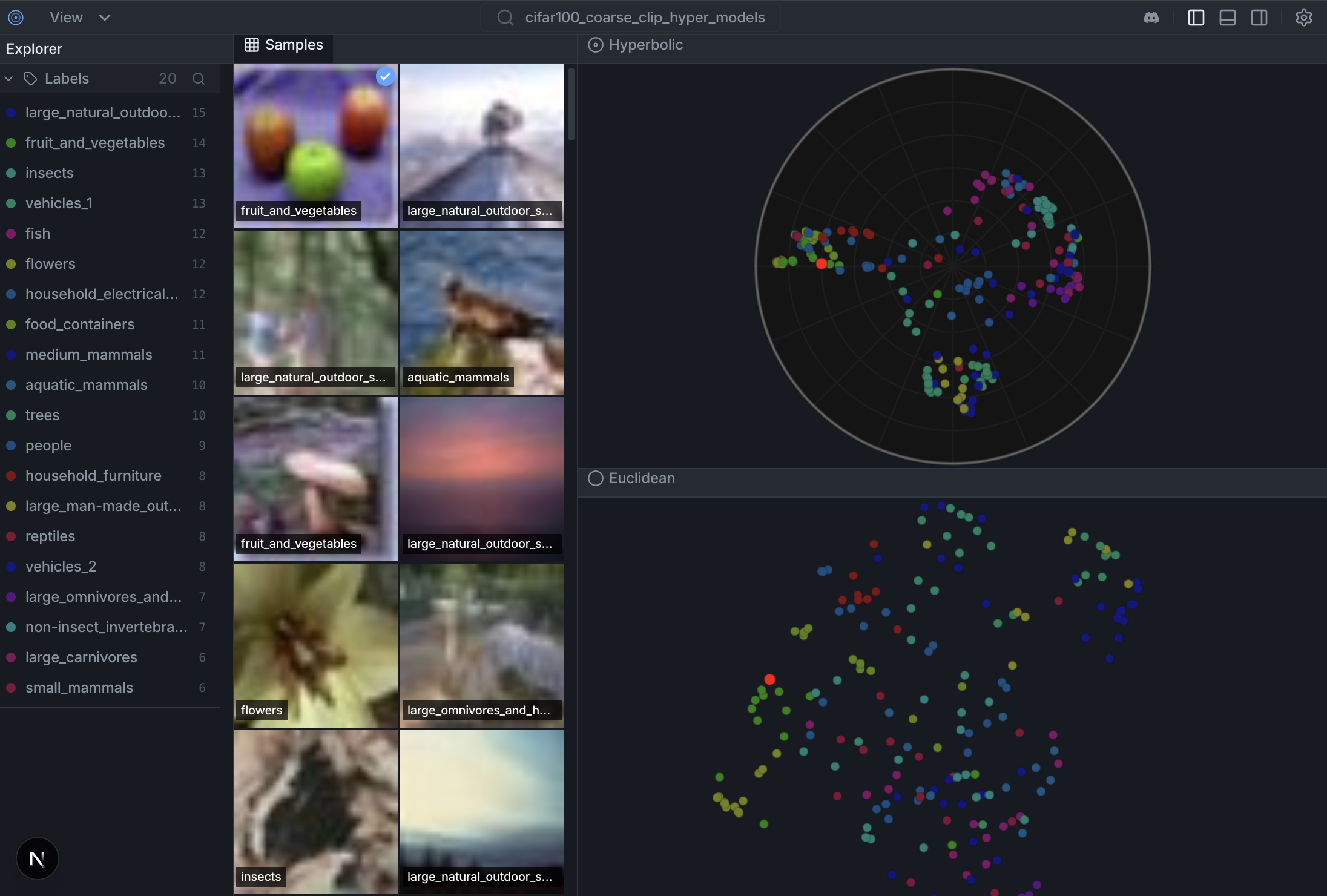
Try the live demo on HuggingFace Spaces
- CLI-controlled UI. Use
hyperviewto create workspaces, compute layouts, change the visible panel, and select samples in the running app. Agents can drive the same app humans see. - Fast embeddings and nearest neighbors. Compute embeddings with built-in or custom providers, persist them per dataset, and query similarity from the runtime API.
- One dataset per workspace. A workspace has one active dataset, its computed spaces, its selected layout, its current selection, and its panels.
- Plugins with backend and frontend. Install a local extension folder with
extension.toml, Python tools, and a native React panel. The panel can call its backend tools through the shared HyperView panel SDK. - Bespoke visualization workbenches. Add dataset-specific panels, providers, tools, and layouts without touching frontend source. Every serious dataset can get the view it needs.
- 01-02-26 — The Geometry of Image Embeddings, Hands-on Coding Workshop (Berlin Computer Vision Group)
- 17-01-26 — The Geometry of Image Embeddings, Hands-on Coding Workshop, Part I (Berlin Computer Vision Group)
- 11-12-25 — Hacker Room Demo Day #2 (Merantix AI Campus Berlin) — First version of HyperView presented
Docs: docs/datasets.md · docs/colab.md · CONTRIBUTING.md · TESTS.md
Install the HyperView CLI first:
uv pip install hyperviewThen make the HyperView agent skill available to your coding agent. In this repo it lives at:
.agents/skills/hyperview-cli/
Use that skill before driving workspaces, embeddings, layouts, runtime panels, or plugins from an agent.
Create a workspace, bind one dataset to it, and drive the running app from the CLI.
hyperview workspace create imagenette-demo \
  --dataset imagenette_clip_20260411 \
  --activate

hyperview serve \
  --workspace imagenette-demo \
  --dataset imagenette_clip_20260411 \
  --no-browser
Then change the live UI from the CLI:
hyperview ui layout set \
  --workspace imagenette-demo \
  --layout-key <layout-key>

hyperview ui panel add \
  --workspace imagenette-demo \
  --panel-id labels \
  --title "Labels" \
  --position right \
  --module-file agent-context/panels/labels/panel.jsx
Plugins use the same runtime path, but add Python tools too:
hyperview extension add agent-context/extensions/selection-profile \
  --workspace imagenette-demo

hyperview tools run selection_profile.summarize \
  --workspace imagenette-demo \
  --param 'sample_ids=["sample-1","sample-8"]'
Legacy one-shot launch is still available for quick experiments:
hyperview \
  --dataset cifar10_demo \
  --hf-dataset uoft-cs/cifar10 \
  --split train \
  --image-key img \
  --label-key label \
  --samples 500 \
  --model openai/clip-vit-base-patch32 \
  --layout euclidean \
  --layout poincare
This legacy flow will:
- Use dataset
cifar10_demo - Load up to 500 samples from CIFAR-10
- Compute CLIP embeddings
- Generate Euclidean and Poincare visualizations
- Start the server at http://127.0.0.1:6262
You can also launch with explicit dataset/model/projection args:
hyperview \
  --dataset imagenette_clip \
  --hf-dataset fastai/imagenette \
  --split train \
  --image-key image \
  --label-key label \
  --samples 1000 \
  --model openai/clip-vit-base-patch32 \
  --method umap \
--layout euclideanimport hyperview as hv
# Create dataset
dataset = hv.Dataset("my_dataset")
# Load from HuggingFace
dataset.add_from_huggingface(
"uoft-cs/cifar100",
split="train",
max_samples=1000
)
# Or load from local directory
# dataset.add_images_dir("/path/to/images", label_from_folder=True)
# Compute embeddings and visualization
dataset.compute_embeddings(model="openai/clip-vit-base-patch32")
dataset.compute_visualization()
# Launch the UI
hv.launch(dataset) # Opens http://127.0.0.1:6262See docs/colab.md for a fast Colab smoke test and notebook-friendly launch behavior.
Traditional Euclidean embeddings struggle with hierarchical data. In Euclidean space, volume grows polynomially (
Hyperbolic space (Poincaré disk) has exponential volume growth (
Try the live demo on HuggingFace Spaces→
Weekly Open Discussion — Every Tuesday at 15:00 UTC on Discord
Join us to see the latest features demoed live, walk through new code, and get help with local setup. Whether you're a core maintainer or looking for your first contribution, everyone is welcome.
Development setup, frontend hot-reload, and backend API notes live in CONTRIBUTING.md.
- hyper-scatter: High-performance WebGL scatterplot engine (Euclidean + Poincaré) used by the frontend: https://github.com/Hyper3Labs/hyper-scatter
- hyper-models: Non-Euclidean model zoo + ONNX exports : https://github.com/Hyper3Labs/hyper-models
MIT License - see LICENSE for details.
If you use HyperView in your research, please cite:
@software{hyperview2025,
  author  = {Mahmood, Matin and Rueda-Toicen, Antonio and Morozov, Daniil},
  title   = {HyperView: Open-source Dataset Curation and Model Analysis},
  year    = {2025},
  url     = {https://github.com/Hyper3Labs/HyperView/tree/main}
}